I’ve carried a theory around for some time now about department names, it’s a bit cynical but I’ve found that it works as a good measure of organisational motivation.
The theory goes like this:
You only have a department when you need to control something. Then you name the department after the thing that you want to stop happening.
Think about it:
You create a department called IT because you want people to stop going out and buying all of those computers and applications.
You create a department called Purchasing because you want to stop people buying things.
You create a department called Financing to stop money being spent.
You create a department called Facilities Management to stop people messing about with the facilities.
I’m not sure where this theory came from because I’ve held it for so long; there is an inkling that it belonged to a previous manager but that’s as good as it gets.
Like I say, its a cynical viewpoint, but I’ve found it to be a wonderful counter-balance to understanding organisational motivation.
Now consider this, in most organisations the IT department reports into the finance department. So what does that make the motivation of the IT department?
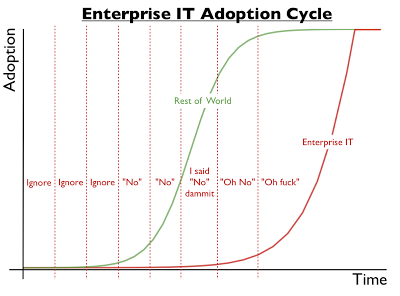
This theory is one of the reasons that I dislike this diagram from a colleague:
The reality is that the Enterprise IT organisation in this situation has done EXACTLY what they were asked to do as a subset of the Finance organisation. If you want Enterprise IT to do something different then you need to build something different and not call it the IT Department!
I’ve spent too many years bent poorly over a keyboard and have suffered many of the consequences.
Recently I’ve been conscious of taking on poor posture in other places as I’ve used my iPhone more and more.
A recent study by Kenneth K. Hansraj, MD, Chief of Spine Surgery at New York Spine Surgery & Rehabilitation Medicine has modelled the physical stresses that our neck posture puts on the cervical spine.
Your head and neck weigh in at about 6kg (13lb). In an upright position that weight is going straight down the spine and not requiring the muscles to do too much. Tilt your head forward and the weight starts to cause strain on the neck muscles; the further forward that you tilt the more strain you are putting on those muscles.
Imagine holding a bowling ball out in front of you on a bent arm and that the kind of pressure we are talking about.
Now imagine doing that for between two and four hours a day and hopefully you’ll start to get the picture that this isn’t a good thing to do.
Tilting your neck forward at a 30 degree angle results in pressures of over 18kg (40lbs), at 60 degrees it’s up over 27kg (60lbs). That 27Kg is over 4.5 times the weight of your head and neck or something like the weight of an 8-year-old.
The conclusion of the study says this:
The weight seen by the spine dramatically increases when flexing the head forward at varying degrees. Loss of the natural curve of the cervical spine leads to incrementally increased stresses about the cervical spine. These stresses may lead to early wear, tear, degeneration, and possibly surgeries.
While it is nearly impossible to avoid the technologies that cause these issues, individuals should make an effort to look at their phones with a neutral spine and to avoid spending hours each day hunched over.
You can find an overview of the research here and more commentary on npr.
I spent some time yesterday playing with the YouGov Profiler which is a tool from the polling organisation that makes a set of demographic information available.
It’s more fun than serious research, but it’s compelling all the same.
A colleague pointed out to me that he, as a Bob Dylan fan, was a lot younger than the 60+ demographic, and isn’t from the West Country. I’m not sure I can see him eating Dorset Blue Vinney Cheese either, but that’s part of the fun of demographics.
When I see tools like this I like to remind myself that it used to take weeks to process data like this in its raw form without anything like as nice a presentation.
It’s also a reminder that information is no longer power, because information is free, it’s relationship that is power.
Some products get a name and stick with that name:
Word
PowerPoint
Excel
Microsoft’s Unified Communications tool-set hasn’t been that fortunate.
A reminder for those of you with a short memory:
Live Communication Server – 2003 to 2006
Office Communications Server – 2007 to 2009
Lync Server – 2010 to 2014
Skype for Business – 2015 to ???
Skype is clearly a much stronger brand than Lync and a merger of the two products was never going to use the Lync brand, but you have to feel a little sorry for a team that’s embarking on yet another renaming exercise.
I love to watch news pundits pontificate about how they see an organisations strategy and their predictions of the various steps in delivering that strategy. We love to feel like we are getting some insight that we could put to good value, but business isn’t a safe place where you do predictable things, it’s a place of competition where sometimes your best strategy is to be surprising.
Microsoft has pulled a few surprises for the pundits in recent weeks all of them revealing in practical terms Satya Nadella’s strategy of “mobile first, cloud first”.
For those of you not watching here were the “surprises”:
Much of the growth of Dropbox has been driven by mobile users wanting to synchronise their data across multiple devices and with colleagues on multiple devices.
In so doing Microsoft cements Office into the working experience of Dropbox’s over 300 million users (May 2014), and more significantly improves on the experience of Dropbox and Google Drive together.
Again a Microsoft strategic play for mobile customers and providing linkage to cloud services without mandating their use. Rather than making access to Word, PowerPoint or Excel a reason to move to Office 365 they are choosing to extend the capabilities of Office 365 with benefits such as the newly announced Clutter, or the extended Groups experience.
Per User Licensing for Windows
Licensing of Microsoft software is a mixture between science, art and chaos theory. Mostly it’s done on a per device basis, it’s further complicated by rights to use licenses on multiple devices in some circumstances depending on the connection method and the ownership of the devices itself. This type of licensing made sense in a world where people were given a device from their employer, with licensed software from their employer, and they did everything on that device. But that’s no longer how people work; people want to use their own devices, they want to be able to connect from anywhere and they want to be able to use virtual desktops if required.
Microsoft has made evolutionary changes to the licensing regime to recognise this. The latest change is the provision of per user licensing for Windows.
Perhaps not as significant as the other two surprises, at first glance, this move licenses a whole set of mobile devices to connect to Windows virtual desktops. This, in turn, clarifies the licensing position for many BYOD scenarios where people want to get access to Windows applications from their own devices. It removes risk and friction from organisations wanting to deliver virtual desktop experiences.
.NET Core now Open Source and Visual Studio Community for Free
One of the driving forces for the explosion of Open Source has been open source development frameworks. Now Microsoft has joined them by moving .NET Core to an open source model extending support into Linux and Mac OS-X at the same time.
Visual Studio has been a popular IDE for a long time (over 17 years) growing and morphing as different development capabilities have been required. The new free Community edition has similar capabilities to the Professional edition so it’s no neutered basic starter edition.
With these releases, we are broadly opening up access to our industry leading platform and tools to every developer building any application in today’s mobile-first, cloud-first world. No matter if you are a startup, a student, a hobbyist, an open source developer or a commercial developer, and no matter the platform you are targeting or the app you are creating, Visual Studio, Visual Studio Online, .NET and Azure will help you be successful.
Another strategic play to reach out to the development community to make Microsoft the chosen starting point for mobile and cloud projects.
Strategy and Surprises
Commentary on each of these surprises is a mixture of defensive strategy and offensive strategy. The best strategy comprises both.
No Email Initiatives are an approach taken by a number of organisations to improve communication be eliminating email. In many organisations email is used as if it were the only communication tool and applied to every problem even when there are far better ways of communicating. Rather than getting people to change the way they use email some organisations have decided that elimination is the only answer.
Proponents of this approach exist, some examples:
Luis Suarez has lived outside his inbox for many years now. He’s managed to dramatically reduce the amount of email he received and spent much more time utilising the value of social software in his time at IBM. Luis is no longer working at IBM, but is still a huge proponent of living outside the inbox.
Atos launched a zero email initiative in 2011 and received much press coverage because of it: “Its aim is to transform towards a social, collaborative enterprise where we share knowledge and find experts easily in order to respond to clients’ needs quickly and efficiently, delivering tangible business results.”
Reading the latest Gartner Hype Cycle for Unified Communications recently I was intrigued to note that they place No Email Initiatives in the Trough of Disillusionment and in the category Obsolete Before Plateau. Reading through the details they estimate that the Market Penetration will be Less than 1% of target audience. Talk about kicking an idea when it’s down!
I used to have a manager who called email BATS – Blame Allocation and Transfer System. Anyone who’s used email in a corporate setting can relate to that definition.
Jack Madden recently proposed banning attachments as an alternative approach with enterprise file sync and share (FSS) and collaborative document editing being a better way of collaborating. He does this whilst acknowledging that there is no escaping email.
The value and the challenge of email is that it is universal. It’s rarely the best answer, but it’s regularly the easiest answer. The alternatives are nowhere near as universal. Neither Twitter or Facebook; nor Google Drive, Office 365 or Dropbox; not even Skype, Lync or WhatsApp are as ubiquitous. With one piece of information you can send someone an email and be pretty confident that they will receive it; add a file and your level of confidence will remain high.
Email is embedded into so many processes; when was the last time you ordered something on-line and didn’t receive the receipt in your email?
To be clear, Gartner isn’t saying that organisations shouldn’t try to radically change the way that people work and to dramatically cut the amount of email but they are saying:
Given the ubiquity of internal email communications in businesses today, elimination of it would truly have a transformational effect, although we believe that few organizations will (or even should) actually achieve it.
The point being that it’s the transformation that organisations should be looking to, not the elimination of email. Organisations need to adopt new ways of collaborating and the result will be a drop in email. It is my belief that organisations that don’t will be overtaken by those that do.
Sue and I both saw our first Aurora Borealis last night – I didn’t take my SLR camera so the header picture isn’t one of mine it’s from here. What we saw was more like this, but it was still a wonderful experience.
A few people have asked how we knew about it, it simple, Twitter and Facebook on my iPhone.
Both Twitter and Facebook are excellent alerting capabilities and when combined with an ever-present mobile phone there’s no excuse for not knowing.
I use two sources of information, and subscribe to both of them in both Facebook and Twitter because I’m a bit of a belt and braces person:
What you have to know about this alerts site is the relevant Kp number for you – this map will help – the bigger it is the more active the Aurora. For my location a Kp above 5 is interesting but it really needs to be higher than that; last night was a 6.67 at its height.
There’s also the excellent Virtual Astro on Twitter who will keep you up to date about everything that’s going on in the sky particularly over the UK. They definitely had the best selection of pictures.
This video gives a clear and concise viewpoint on how HM Government is changing its security classification regime.
It’s common for technology to move ahead of regulation and legislation. So it’s great to see the UK government moving the regulations to account for the changing technology. That’s not to say that it’s going to be an easy change though:
This is 6 years after an upgrade option was available in Windows Vista (30th January 2007), although arguably a practical upgrade option only arrived in Windows 7 (22nd October 2009) but even that has been available for 50 months.
In a consumer driven world things got done 10 times faster.
Some of this can be attributed to newer technology, but most of it is due to the different approaches that are required in a consumer world and hence built in from the start.
I’ve recently got a new phone and as such I’ve started afresh on the round of configuring applications and connecting to networks.
As I’ve created each connection I’ve been conscious of the things that we are expected to give away to get something for free; an email address here, my date of birth there, my mother’s maiden name somewhere else. I’m always expected to give away my email address and normally my home address too.
Each transaction over steps, just a bit, the information that they require to achieve their purposes. None of them request all of the information, but each of them requests something different.
The net result is sets of my personal information littered across databases, servers and storage.
It wouldn’t take much to extend the access information from one system into access to information from another system, and from that access to information from another system. That, in turn, would provide access from low security systems into ones where I regard security as paramount – such as my bank account.
In our house you’re not allowed to bring an electronic device to the table, but I see this everywhere I go. Also, I’m not sure it’s only pre-meal, it seems that people find it increasingly more difficult to last more than a few minutes without connecting. In this I’m apparently one of 62% of people who disapprove of keeping a phone at the table during a meal.
I’m not sure about the 1010 AD picture, it’s more like 1910 AD, in 1010 AD (approximately) the Vikings were just discovering America.
The other night I went to pick up my daughter from a friend’s house along with some other friends. I was followed out by a line of teenagers all looking at their mobile devices. I joked with them that we were related to moths – “most look at the light, must look at the light”.



 Graham Chastney