My Tools: OutDoors Great Britain

I’ve got a bit of an ambition in process, it involves climbing hill in the North West of England. I’m not going to say quite what the ambition is in public because I’m running a bit behind on the schedule at the moment and it’s still got a long way to go.

Walking in safety requires really good information and the best information comes from a map. While I’m out and about with my boots and my backpack I normally carry two maps.

The first map, that I always carry with me (and so should you) is a paper one (it’s not actually paper, it’s some kind of waterproof composite). These paper maps are accurate and never break down, but they aren’t the easiest to use and lack some information, particularly the most vital piece of information – “where exactly am I?” Map reading is a skill that everyone serious about walking should gain, I don’t want to diminish that in any way.

Having said that, I also carry around a second set of maps on my iPhone; the particular App I use is called OutDoors Great Britain. Within the UK the benchmark maps come from the Ordnance Survey (OS), being a government organisation they make their maps available to other organisations through a commercial framework. Whilst out and about in the countryside you don’t want to be reliant upon a network signal, they’re often not available. Thankfully the commercial framework with the OS allows applications to provide downloaded maps schematics and data, these are normally charged on a per area basis which is what OutDoors do.

You can also use free map sources which are quite good, but obviously rely on a level of network connectivity.

Integration of the App with the iPhone’s GPS and Compass capabilities gives a reassuring answer to that “where am I?” question. It doesn’t just answer that question though it also answers the, sometimes more important, question “which way am I looking?”

I tend to plan my routes on paper, but the App can also do that. I tend not to record my routes either, but again the App can do that.

OutDoors Great Britain – Launch Page

IMG_2064.PNG


OutDoors Great Britain – Map Page

IMG_2066.PNG

OutDoors Great Britain – Map Options

IMG_2065.PNG

My Tools: Scanabble

There was a time when a scanner was a precision piece of equipment that required it’s own dedicated supporting PC. They weighed about the same amount as a rugby player and were as temperamental as a rugby player who’s just emerged from a scrum with half his ear missing.

Times have changed. We all carry cameras in our mobile phones that are at least as good as those early scanners, but we don’t want a picture of a document, we want what the scanner used to give us, a readable scan of a document. That’s what Scannable gives me.

Scannable comes from the Evernote team and this is how they describe it:

Scannable captures the paper in your life quickly and beautifully, transforming it into high-quality scans ready to save or share. Whether on the go or at the office, send paper on its way and move on.

That pretty much sums up how it works.

The process is really very simple:

1. Show a document to the app:

Scannable

2: Once the app has found a document it will take a scan of it and save it. There’s no need for lining things up and clicking take. Once it recognises a document it takes the picture:

Scannable

3: You can take multiple pages in the same scan. Then give the scan a name and share it:

Scannable

4: Naturally the best place to send it to is Evernote, which give you the option to pick a notebook:

Scannable

Done!

My Tools: IFTTT – Automating Your Life

Why do it yourself if you can get a computer to do it for you.

IFThisTHENThat

It really is that simple:

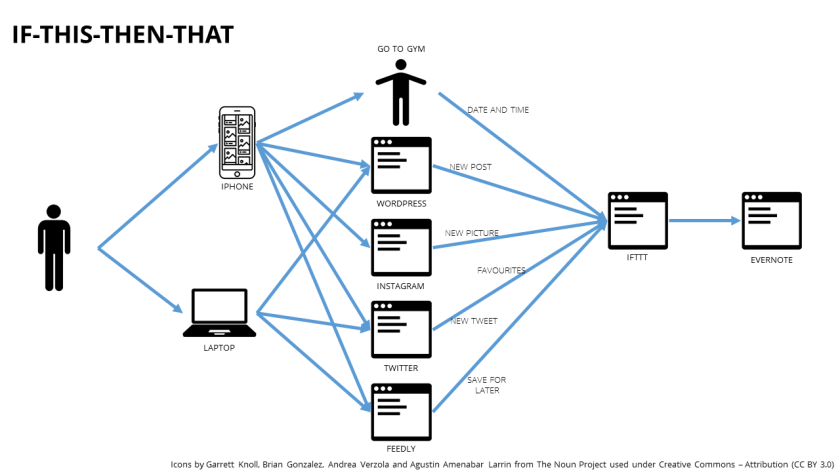
  • IF I favourite a tweet THEN create a note in Evernote
  • IF I go to the gym THEN update a log of gym visits in Evernote

In IFTTT terms the This is a Trigger, the That is an Action. A Trigger with an Action is known as a Recipe. The sources of Triggers and Actions (like Twitter, or Instagram) are known as Channels. There are currently 164 Channels.

Imagine a service on the internet and it’s likely that there will be a channel for it which is likely to have a set of triggers then start thinking about what you could do:

  • Every time I go to the gym I could post on Facebook.
  • Every time I leave the office I could email my wife.
  • Every Saturday I could send an email of the day’s weather.
  • Every time TIME.com posts in a particular section I could get IFTTT to phone me and tell me.
  • Every time it’s sunset I could turn on my Philips Hue lights (not that I have any).

I only use a few channels, but that’s all I need for now. It’s amazing what you can do with a few recipes:

  • IF I favourite a tweet THEN create a note in Evernote with the tweet details in it.
  • IF I write a tweet THEN create a note in Evernote with the tweet details in it.
  • IF I post a picture to Instagram THEN create a note in Evernote with the picture in it.
  • IF I write a Blog post THEN create a note in Evernote with the text and picture in it.
  • IF I mark a blog as Save for Later in Feedly THEN create a link note in Evernote with a subset of the post text in.
  • IF I arrive at the gym THEN amend a log note in Evernote with time and date.

My recipes all use Evernote as the target; it’s the place that I use to record my online life, and some of my physical life too, but that’s a post for another day.

If you are wondering how you say IFTTT then the advice from the makers is to image GIFT without a G.

if-this-then-that

My Stories: “Y’alright Wack”

Parking between the caravans resident in the “orchard”.

Walking along the straight narrow path, past the ample, two extended, workshop.

Seeing that the usually open door was closed progressing into the garden.

Looking across the garden to see how busy the top of Latrigg was and noticing that the bench was empty.

Saying hello to the search and rescue dogs noisily doing their job next door.

Climbing the few steps into the kitchen saying hello to Pauline stood their like a sentry on duty.

Turning the corner into the lounge.

There Doug would often be in his chair, reading with the aid of a standard desk lamp.

The greeting was simple, yet meaningful all the same “Y’alright Wack”.

I hadn’t always been Wack, the first time we met, and for some time after that, he called me Mark. Sue, now my wife, then my girlfriend, found this very embarrassing. Mark was a friend of her’s who would visit the house from time to time. I wasn’t embarrassed, it just made me smile.

I would sometimes get my real name, but more normally I was simply Wack and happy to be pal, mate, friend. As a stranger from the other side of Pennines it was nice to be welcomed in.

Many a time I wouldn’t get any further than the front of the workshop where he’d be reassembling some newly restored part of an Ariel, BSA, Norton, Royal Enfield and such like. Two wheeled marvels of chrome and gleaming paint on their way back to full health and occasional trips on the open road.

At other times he would be resident inside the workshop surrounded by tools, machines and various components. There was skill to the way he worked, but he wasn’t the tidiest of craftsmen, I liked that, because I’m not the tidiest either.

The workshop is cold now.

Most of the machinery has gone and so have the components.

I think I’ll carry on being Wack though.

Acronyms: WOMBAT

Not sure where I first heard this one, it’s going back a long way:

Waste(r)
Of
Money
Brains
And
Time

It’s served me well down the years.

Acronyms: SMAC

Acronyms invade our world every day. Sometimes I quite like them, other times I don’t. This one is one the ‘don’t like’ side, but it’s increasing in popularity so I thought I would document it here:

SMAC: Social, Mobile, Analytics, Cloud

It brings together a number of growing trends in the IT arena that are having a direct impact on day-to-day and business life.

In the private sector, the new technologies known collectively as SMAC – social media, mobile, analytics and cloud – are driving revolutionary changes in how companies interact with their customers. – CSC

While social, mobile, analytics and cloud technologies add a new dimension to your business model, to fully maximize their value consider the sum is greater than its parts. – Cognizant

Every fifteen years or so, the IT industry has witnessed new innovations in computing which have changed the way IT services are delivered to the business and end users. After the mainframe era, mini-computing era, personal computer and client-server era, and the Internet era (or more correctly, the “Web” era), we’re now in what many call the fifth wave of corporate IT. This fifth wave is characterized by a new master IT architecture comprised of social, mobile, analytics and cloud technologies collectively known as SMAC. – ComputerWorld

The next wave of IT can be found in Social, Mobile, Analytics, Cloud (SMAC) delivered as a holistic solution known as the SMAC stack. SMAC technologies are redefining enterprise IT and will remain the driving force of enterprise level IT for decades to come. – CapGemini

https://books.google.com/ngrams/interactive_chart?content=SMAC&year_start=1900&year_end=2000&corpus=15&smoothing=3&share=&direct_url=t1%3B%2CSMAC%3B%2Cc0

SMAC apparently started being used in the 1940’s, but I suspect that was for a different meaning as there are many. A few of the meanings are here on Wikipedia, the Social Mobile Analytics Cloud page on Wikipedia has been deleted so that link doesn’t give any useful insight. Uses of SMAC also include the Scottish Macaroni Appreciation Club.

I’m not completely sure why I don’t like it as an acronym but it has a lot to do with the association to illegal drugs and violence towards children.

Like all good IT acronyms people will love to use and abuse it to the point where it no longer has any meaning (see Concept Entropy). I suspect that SMAC will cease to have any meaning by about this time next year, especially as it has within it Cloud which has already lost its meaning and Social which is approaching meaninglessness.

Off now to see if I can find some innovative SMAC (yuck).

There’s always the danger that we get the letters the wrong way around and end up with a completely different acronym:

You're being distracted by your mobile phone, even though you aren't using it!

This is the abstract from a report which was recently published in Social Psychology:

Research consistently demonstrates the active use of cell phones, whether talking or texting, to be distracting and contributes to diminished performance when multitasking (e.g., distracted driving or walking). Recent research also has indicated that simply the presence of a cell phone and what it might represent (i.e., social connections, broader social network, etc.) can be similarly distracting and have negative consequences in a social interaction. Results of two studies reported here provide further evidence that the ‘‘mere presence’’ of a cell phone may be sufficiently distracting to produce diminished attention and deficits in task-performance, especially for tasks with greater attentional and cognitive demands. The implications for such an unintended negative consequence may be quite wide-ranging (e.g., productivity in school and the work place).

Just the “mere presence” of the phone may be enough for you to be distracted from that really important task that you are doing – like driving, or reviewing that multi-million pound deal, or researching a cure for cancer, or learning how to be the next great coder, or caring for your friends and family.

I’m sitting here with two mobile phones on my desk so this morning I’m going to try an experiment. The phones are going in a drawer and I’ll see whether I feel any less distracted than I normally do, hopefully this is enough to remove them from “mere presence”. Perhaps this will become a new way of working. I’m still going to allow audio distractions from someone ringing me because that’s part of the important job, but I’m going to see if I can focus a bit more by removing this needless distraction.

Visitor Review 2014 – Holding Steady

I primarily write this blog for my own benefit but I still find some value in understanding who is visiting.

The best that can be said about 2014 is that the numbers held steady on 2013. Actually, if I’m honest the volume of visitors actually reduced by 1.8% which isn’t great.

There are some interesting insights behind that raw statistic:

  • The number of direct visitors fell off significantly.
  • The numberofreferals from social media sites grew dramatically:
    • Facebook continues to be the largest and grew over 20%.
    • Twitter and LinkedIn referals grew ten-fold.
    • Google+ referals were small and down 50%.
  • Google continues to be the largest referer and stayed the most static.
  • There was a 50% growth in visits from mobile devices.
  • There was a 60% growth in tablets.
  • Chrome continued its growth with Firefox being the biggest loser.
  • The UK is the largest visitor and continues to grow, up 50%.
  • The United States is the second largest visitor, but has shrunk by 40%.

Onwards into 2015.

My Stories: Top 6 for 2014

In 2014 I started writing a few reminiscences under the title of My Stories, I’ve only written six of them, there popularity has been in this order:

  1. My Stories: Mr Smith
  2. My Stories: £9 or £10
  3. My Stories: Jet Planes, Helicopters and Army Vehicles
  4. My Stories: Sitting in the Corner
  5. My Stories: Two Allotments
  6. My Stories: Hornsea Waves

Blessings: Top 20 for 2014

I’m always a bit intrigued by which of the Blessing posts gets visitors. Most of them are the most recent ones, but some of them go a long way back. Number 20 – Running in the Company of a Happy Few goes all the way back to 2005:

  1. Blessings #183 – Counting the thing I have that money can’t buy
  2. Blessings #197 – Laughing Anyway
  3. Blessings #198 – Personal Proverbs
  4. Blessings #196 – A Full Notebook
  5. Count Your Blessings #120 – Short Stories
  6. Blessings #199 – My Stories, Our Stories
  7. Count Your Blessings #64 – Stories, Fables and Parables
  8. Blessings #201 – Seen, Heard and Known
  9. Blessings #202 – Home
  10. Blessings #200 – The Buzzard Feather
  11. Blessings #194 – Chronos
  12. Blessings #195 – Photography Books
  13. Count Your Blessings #90 – The Alarm Call of the Blackbird at Dusk
  14. Blessings #176 – Hovis Digestives
  15. Count Your Blessings #54 – Sky Watching
  16. Blessings #160 – Sun’s Rays
  17. Blessings #193 – The Smell of Summer Rain
  18. Blessings #189 – Travelling a New Path
  19. Count Your Blessings #91 – Decorating Christmas Trees
  20. Count Your Blessings #37 – Running in the Company of a Happy Few

Blogs: Top 50 for 2014

Having already highlighted the top Friday posts and the top Quotation posts, here’s the top 50 of the rest:

  1. A Lack Of Planning On Your Part Does Not Constitute An Emergency On Mine
  2. BYOD and Productivity Statistics
  3. Axiom: People join companies, but leave managers
  4. Windows Live LifeCam
  5. The Bergen Facebook Addiction Scale (BFAS)
  6. Rich Pictures
  7. In the Office before Christmas
  8. The Productive Workplace: The Novel and Adaptive Thinking Space
  9. Concept of the Day: Cultural Plasticity
  10. I love what I do – because – I’m good at what I do – because…
  11. HM Government: Changing the security classification system
  12. Slow Logon v Slow Applications
  13. Aurora Notifications
  14. The Productive Workplace – Activities and Skills
  15. Ignore Everybody – and other quotations
  16. Team Development: Forming – Storming – Norming – Performing
  17. “Bring your own Everything” by Steve Richards
  18. Axiom: The 10X Employee
  19. Factors of the Productive Workplace – Introduction
  20. Productive Workplace: Virtual Collaboration Spaces
  21. Productive Workplace: Cognitive Load Management Spaces
  22. The Power of Consumerisation – Upgrade Statistics
  23. Is my job going to be computerised? (UK edition)
  24. A Field Guide to Procrastinators
  25. Is my job going to be computerised?
  26. Top for 2013: The Rest
  27. Office Speak and Buzzword Density
  28. Productive Workplace: The Trans-disciplinary Space
  29. Bring Your Own Device (BYOD) v Choose Your Own Device (CYOD)
  30. BYOD Concept Map (Version 1)
  31. Buzzword Density: 2.0
  32. My Tools: Lift
  33. What’s your mobile device posture?
  34. The Productive Workplace: The Space for Computational Thinking
  35. Learning of an Architect
  36. xkcd: Turbine
  37. “There’s no such thing as information overload only failure to filter”
  38. Slimming down (my blog subscriptions)
  39. How to Measuring Knowledge Worker Output? Metrics?
  40. Privacy Degradation by Degree
  41. Dilbert on Abstraction
  42. The Productive Workplace: The Socially Intelligent Space
  43. Microsoft and the Surprising Strategic Play
  44. Modern day life rules #1 – Public space noise
  45. My Tools: Feedly
  46. Factors of the Productive Workplace – A Little Personal History
  47. The Productive Workplace – Sense-making Spaces
  48. Concept Mapping (and Rich Pictures)
  49. Productive Workplace: The Happiness Blanket in the Office?
  50. Department Naming Theory

Blessings #202 – Home

There’s a well known song that has these words in the chorus:

Wherever I lay my hat, that’s my home

I don’t believe them!

Home is the place where you fit in, and it fits around you.

Whenever I am away from home I spend much of my time trying to find things and checking where things are. At home I don’t have to think about where I’ve put my keys down; even if I can’t remember where I put them I know the places where to look. When I’m away from home they could be anywhere.

I’ve spent enough nights in hotel rooms to develop a twitch every time I leave a room – “Where’s the room key card? Where’s my wallet? Have I got everything?

At home there is an unspoken routine. We don’t have to be constantly talking through what we are going to do next, for most of the time we instinctively know.

We know the signs of who’s in and who’s out when we are home. We have three cars in our house, these days, but the drive is only two cars wide. If everyone is in there is always one car blocked in, but that’s not a problem because at home we know who is going to be needing there car next so we know where to park.

Home is the place where you know which draw to look in for which clothes. You don’t have to go through all of the drawers trying to find your socks.

At home you don’t have to think too hard about what clothes you are going to wear.

Home is a place of memories. Memories of evenings with friends around the table. Memories of chocolate chilli roulette. Memories of huddles of young people around a fire pit. Memories of Christmas mornings and birthday teas. Memories of newborn babies entering the place where they will build their own library of memories. Memories of saying goodbye as those babies, now grown, set out on new adventures of their own. Memories of tears and disappointments too.

Home is a privilege and a joy. It saddens we to know that in this world of conflict and refugees so many don’t live in a place that they can call home. But I also have a hope that one day this world will be swept aside and we will move from this home to another home where there is no more conflict and strife, a place where everyone is at home.