Slow Logon v Slow Applications

I hear a lot of people complaining about the amount of time it takes them to start their device and get working. Glen CoeI hear this complaint a lot more often than complaints about slow applications. I’m sure that people have both problems – but they complain about one, massively, above the other.

Slow logon is an issue that is certainly very visible to people, but I wonder how much impact on someone’s days to day productivity it really has. So I’ve done some analysis comparing the impact of slow logon with the potential impact of slow applications.

image

It can be seen from these numbers that a 15 minute interruption for logon would be roughly equivalent to me of my applications going 4% slower.

Given the choice of slow logon or slow applications which would I choose?

I would choose slow logon over slow applications every time. Why? Because it has a lesser impact on my productivity but also I’d rather have a single 20 minute interruption at the beginning of the day.

Also, I’m not necessarily comparing apples with apples here. The numbers for application usage are times when I am really working on a computer. The numbers for slow logon are times when I might have been working, but equally, I might have been getting myself a coffee, or talking to a colleague.

Obviously, I’d rather not have either!

So how did I get to these numbers?

The logon numbers are based on the amount of non-productive time I’d have, assuming that I logon 6 times in the working week and I’m not doing any work for the duration of the logon time.

The application numbers are based on the amount of time that I have used my applications since the beginning of the year according to Wakoopa.

For all of this I’ve assumed that I work an 8 hour day, which isn’t true, but it’s near enough and doesn’t change the ratios only the absolute numbers. hence there is quite a close alignment of the application impact on overall productivity.

(Update: I noticed a mistake in my numbers so I’ve changed it a little)

“Two million lured to spoof tan site”

Sometimes I read a story and wonder whether there is really any hope for us.The Road to Inveraray

A spoof website offering computer users a tan through their screens has received nearly two million visits in just a few months.

Computertan.com was launched by charity Skcin in a bid to raise awareness of the danger of ultraviolet rays.

Its new infomercial, designed by advertising agency McCann Erikson, promises viewers a tan from the safety of their desk and offers a free trial of the "tantastic experience".

The slick production even runs a fake calibration tool to set up the gadget. But images of UV bars on the screen soon fade to reveal the message: "Don’t be fooled. UV exposure can kill".

Viewers are then met with graphic pictures of damage done by ultraviolet rays.

From MSN

That’s right 2 MILLION people believed that their computer screen could give them a tan, and what’s more, they thought that it was a good idea?

The whole thing is wrong on so many levels that I don’t quite know where to begin – so I’m not going to bother even trying.

Rich Pictures

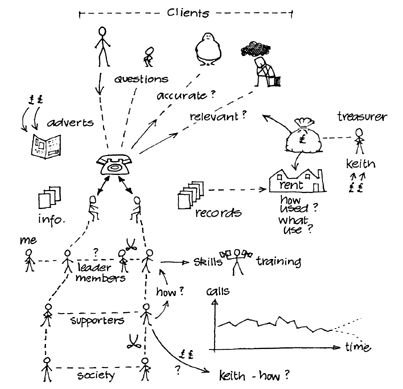
I’m doing a bit of work with Rich Pictures at the moment. I’m quite enjoying the storyboard elements of the process.

For those of you who don’t know what I am talking about then here is an example from the Open University:

richpicture

Basis isn’t it? That’s the point.

There are a number of elements to a Rich Picture:

  • pictorial symbols;
  • keywords;
  • cartoons;
  • sketches;
  • symbols;
  • title.

The most interesting part for me is the “cartoons” part. As business people we can be so “professional” that we want things to look great from the start with fancy graphics. Rich Pictures allow us to step back and to deal in symbols and icons to depict an issue.

The challenge I am anticipating is that the Rich Pictures that I have created will need to go through a review cycle with “professional” people. As such I am going to have to battle the tendency to water down the message that comes with reviews. The challenge that I am wanting to depict is a big challenge with lots of facets to it. if we review it too heavily we will make it look far simpler and remove all of the value.

Social Networking – Changing Society

I’ve just sat down for tea (dinner if you are in the south of England or some other countries) with the family.Loch Awe

The topic of discussion this even was a story about a friend of my daughter who had been told off in school by here teacher.

What for I heard you asking?

For putting on here Facebook status: “I hate [the teacher]

I’m sure that this little story is being played out with different characters and different technology all over the world but the essence is the same.

It’s a changing society in which we are all going to have to learn new skills and take different precautions.

It never would have happened in my day.

Writing and reading – getting down to it

Over recent years I’ve noticed a significant shift in my attention span. I’d like it to be getting longer but unfortunately it’s getting shorter. Island Hoping

There may be a reason for this; we recently discovered that the central heating boiler in our house had been incorrectly fitted and was doing its best to poison us all.

But I’m not sure it’s that simple.

I wonder whether it’s also a problem with the number of distractions that I now have available to me.

This week I decided to do something about the distractions.

One of the main distractions is my phone, it always seems to ring at the most inopportune times. This week I made a decision (please don’t tell anyone), I put my phone onto silent and waited to see what would happen.

I’ve written and read more in the last few days that I have for weeks.

I haven’t missed a single really important phone call – and there have been some.

The Lost Generation – Monday Morning Inspiration

This video speaks for itself, stick with it it’s worth the ending:

Make screens a priority

How long do you think that you spend looking at some form of screen every day?Wisley in the Autumn

Television? Laptop? Mobile phone?

According to the New York Times it’s likely to be longer than you think:

In fact, adults are exposed to screens — TVs, cellphones, even G.P.S. devices — for about 8.5 hours on any given day, according to a study released by the Council for Research Excellence on Thursday. TV remains the dominant medium for media consumption and advertising, the study found. The data suggests that computer usage has supplanted radio as the second most common media activity.(Print ranks fourth.)

That’s right 8.5 hours a day.

Even excluding TVs that’s a lot of time, spent on screens at work. So why do we spend so little on the actual screen itself? It’s the primary tool that we use.

I’m constantly amazed when I go around offices to see the way that people are using and abusing the screen that they use all day, every day.

I’ve already written about multiple monitors. If I could communicate one thing to people that I know would radically change their productivity it would be that. But there is more to it than that.

In most organisations that I know screen purchases are tightly controlled. You have to be really special to have anything more than the standard screen. In many ways this control is completely disproportionate to the value that a good screen gives and the relative cost.

The number of people who have cracked or severely scratched mobile phone screens never  ceases to amaze.

There are times when I feel like going around with a cleaning cloth and revealing to people the wonders that lurk beneath. Go on, I dare you, clean a screen today.

Why play is vital — no matter your age

I love the TED talks, they are great way of hearing thought provoking ideas presented in a way that is always engaging.

This morning I listened to Stuart Brown talking about why play is vital – no matter your age.

http://video.ted.com/assets/player/swf/EmbedPlayer.swf

Speaking as a British person, we have a strange relationship with play.

We have invented some of the worlds most popular sports and continue to create new ones, but business is a serious business. And yet, there’s still a lot of business getting done on the golf course.

We all grown when someone asks us to do an “ice breaker”, but I’ve seen people turn into children as they do.

I quite like the concept of the wearable meeting – you’ll need to watch to find out.

There are also interesting thought here for people who work from home and only interact with people on the phone.

What I tend to do is put the TED videos onto my iPod and listen to it in the gym. The audio is often enough, but you also get to sense when there is something interesting to see and can go and have a look.

Rebuilding reputation – search and connections

I’m about the shut down my old blog address and move exclusively to this one, so I thought I would write a little about my experiences.

Walla CragI’ve not been updating the other one for a while now, the traffic has mostly moved over because of the joy of RSS and Twitter.

What hasn’t moved over are a few search terms where I was quite prominent. These were relating to my posts on Windows Live Writer Dictionary, Windows Server Single Instance Storage and most significantly all of the thinking about Brain Strength.

The posts on Windows Live Writer Dictionary are largely obsolete, and the information on Single Instance Storage in Windows is very old now.

There are still a bucket load of internal links to fix, but I’ll get around to that in time.

It’s certainly not a seamless exercise, but it’s quite nice to go through it and know that my data is mostly portable.

Broader Networks, Larger Storage, Faster Processing

Crossthwaite ViewsIn many ways the fancy, even magical, world of IT can be broken down into three basic elements; storing stuff, calculating stuff and moving stuff. Everything we see around the Internet is driven by the inexorable progress of broader networks, larger storage and faster processing.

Ten year trends for networks, storage and processing show them getting ever faster, broader and larger.

We may not yet know how we are going to use all of this extra capacity, but one thing we can say is that the past shows us the future.

I started my IT journey at a time when we regarded kilobit networks as broad, megahertz processors as fast and megabyte storage as huge.

When I started in IT as a career I supported IBM DISOSS on the mainframe and the nearest thing anyone got to a desktop device was an IBM DisplayWriter. There were also a few VAX machines around used by those specialists in the engineering organisation.

The DISOSS system I supported, for those of you too young to know any better, was an early email system. It was so early, in fact, that it was pretty much bounded by the mainframe on which it ran. There was no connection to the internet, and limited connections to other parts of the organisation. SMTP was frowned upon as not being ready for the enterprise.

Apart from the DisplayWriters everyone else accessed the system via a dumb terminal over a dedicated SNA network; TCP/IP wasn’t ever discussed. We now have access to megabits of bandwidth at our houses, all of it running TCP/IP of one form or another.

I carry around more storage in my bag than was available within the multi-room mainframe that I started on.

The way that we use applications and services has changed radically. The internet has seen to that.

Information was an expensive commodity back then, most information is now effectively free. Search is expected and it’s free too.

Text was the only way of communicating, even tables within text were difficult. Every day I deal with diagrams photographs, graphical representations. Every time I start Audacity to edit some audio I am blown away by the realisation that I am doing this on a consumer PC with free software.

Years ago I used to have a set of floppy disks in a draw. Managing the data on these disks would take a significant amount of time. I probably had less than 100MB stored, but managing it was a complete pain. I now manage over 1TB of data, but only spend a minimum amount of time managing it.

I used to spend more on a CompuServe email account than I now spend on hosting this blog where I get unlimited storage. The paid-for email account could only handle a tiny amount of storage and it couldn’t handle attachments at the beginning. I now have a choice of multiple free email services allowing me to store hundreds of gigabytes and easily handle large emails.

To use someone else’s words, remember: “you aint seen nothing yet”.

Please make me one of these: Universal read count

Crossthwaite ViewsI see information in many streams, email, IM, twitter, RSS reader, etc. Unfortunately my brain isn’t good enough to remember everything that I have already read so I regularly find myself going to the same piece of information more than once.

Within each stream I’m unlikely to go back more than once because I get visual indicators that I have already read it. The main problem is between streams. That’s not to say, though, that people won’t send me the same piece of information more than once in the same stream.

I’d quite like a service that handled the read status for me, across all of the streams.

I should get a visual indicator that a link in twitter points to the same content as the blog post in my RSS reader, and they should both show anything that I have already consumed from a browser. Oh, and while I’m at it, it needs to do that across any one of the devices that I’m likely to use, and it needs to handle shortened urls.

My RSS Reader (FeedDemon) does a reasonably good job of keeping the read count in-synch across devices, but nothing between streams.

What I am looking for is to be able to mark parts of the Internet as “read”.

I’d also like this status consolidation capability to be searchable, especially by date. I am reasonably good at remembering when I read something, but not so great at remembering where I read it.

I’m sure there are a load more functional requirements that I would surface if I had time to think about it, but for now, this will do.

Has anyone done anything like this?