My Tools: OutDoors Great Britain

I’ve got a bit of an ambition in process, it involves climbing hill in the North West of England. I’m not going to say quite what the ambition is in public because I’m running a bit behind on the schedule at the moment and it’s still got a long way to go.

Walking in safety requires really good information and the best information comes from a map. While I’m out and about with my boots and my backpack I normally carry two maps.

The first map, that I always carry with me (and so should you) is a paper one (it’s not actually paper, it’s some kind of waterproof composite). These paper maps are accurate and never break down, but they aren’t the easiest to use and lack some information, particularly the most vital piece of information – “where exactly am I?” Map reading is a skill that everyone serious about walking should gain, I don’t want to diminish that in any way.

Having said that, I also carry around a second set of maps on my iPhone; the particular App I use is called OutDoors Great Britain. Within the UK the benchmark maps come from the Ordnance Survey (OS), being a government organisation they make their maps available to other organisations through a commercial framework. Whilst out and about in the countryside you don’t want to be reliant upon a network signal, they’re often not available. Thankfully the commercial framework with the OS allows applications to provide downloaded maps schematics and data, these are normally charged on a per area basis which is what OutDoors do.

You can also use free map sources which are quite good, but obviously rely on a level of network connectivity.

Integration of the App with the iPhone’s GPS and Compass capabilities gives a reassuring answer to that “where am I?” question. It doesn’t just answer that question though it also answers the, sometimes more important, question “which way am I looking?”

I tend to plan my routes on paper, but the App can also do that. I tend not to record my routes either, but again the App can do that.

OutDoors Great Britain – Launch Page

IMG_2064.PNG


OutDoors Great Britain – Map Page

IMG_2066.PNG

OutDoors Great Britain – Map Options

IMG_2065.PNG

My Tools: Scanabble

There was a time when a scanner was a precision piece of equipment that required it’s own dedicated supporting PC. They weighed about the same amount as a rugby player and were as temperamental as a rugby player who’s just emerged from a scrum with half his ear missing.

Times have changed. We all carry cameras in our mobile phones that are at least as good as those early scanners, but we don’t want a picture of a document, we want what the scanner used to give us, a readable scan of a document. That’s what Scannable gives me.

Scannable comes from the Evernote team and this is how they describe it:

Scannable captures the paper in your life quickly and beautifully, transforming it into high-quality scans ready to save or share. Whether on the go or at the office, send paper on its way and move on.

That pretty much sums up how it works.

The process is really very simple:

1. Show a document to the app:

Scannable

2: Once the app has found a document it will take a scan of it and save it. There’s no need for lining things up and clicking take. Once it recognises a document it takes the picture:

Scannable

3: You can take multiple pages in the same scan. Then give the scan a name and share it:

Scannable

4: Naturally the best place to send it to is Evernote, which give you the option to pick a notebook:

Scannable

Done!

My Tools: IFTTT – Automating Your Life

Why do it yourself if you can get a computer to do it for you.

IFThisTHENThat

It really is that simple:

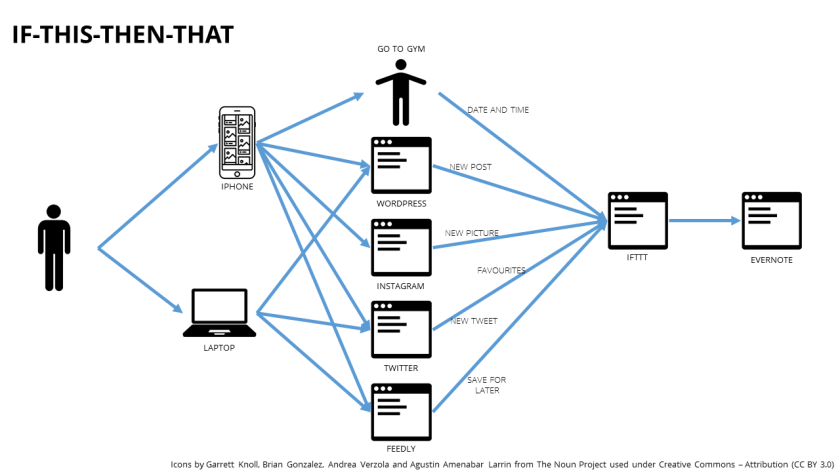
  • IF I favourite a tweet THEN create a note in Evernote
  • IF I go to the gym THEN update a log of gym visits in Evernote

In IFTTT terms the This is a Trigger, the That is an Action. A Trigger with an Action is known as a Recipe. The sources of Triggers and Actions (like Twitter, or Instagram) are known as Channels. There are currently 164 Channels.

Imagine a service on the internet and it’s likely that there will be a channel for it which is likely to have a set of triggers then start thinking about what you could do:

  • Every time I go to the gym I could post on Facebook.
  • Every time I leave the office I could email my wife.
  • Every Saturday I could send an email of the day’s weather.
  • Every time TIME.com posts in a particular section I could get IFTTT to phone me and tell me.
  • Every time it’s sunset I could turn on my Philips Hue lights (not that I have any).

I only use a few channels, but that’s all I need for now. It’s amazing what you can do with a few recipes:

  • IF I favourite a tweet THEN create a note in Evernote with the tweet details in it.
  • IF I write a tweet THEN create a note in Evernote with the tweet details in it.
  • IF I post a picture to Instagram THEN create a note in Evernote with the picture in it.
  • IF I write a Blog post THEN create a note in Evernote with the text and picture in it.
  • IF I mark a blog as Save for Later in Feedly THEN create a link note in Evernote with a subset of the post text in.
  • IF I arrive at the gym THEN amend a log note in Evernote with time and date.

My recipes all use Evernote as the target; it’s the place that I use to record my online life, and some of my physical life too, but that’s a post for another day.

If you are wondering how you say IFTTT then the advice from the makers is to image GIFT without a G.

if-this-then-that

My Tools: Feedly

In 2008 I wrote about my use of FeedDemon as my feed reader of choice. In those days it would synchronise the list of feeds and the read/unread status to NewsGator (remember that).

Then NewsGator changed their focus and FeedDemon moved to synchronise with Google Reader. Then in July 2013 Google Reader was shut down forcing the most valuable feature out of FeedDemon and its effective demise.

I was never a fan of Google Reader but made extensive use of its aggregation with FeedDemon. I didn’t fancy building a new set of subscriptions so wanted an alternative that would support seamless migration from Google Reader. The available keyboard short-cuts were important as was the availability of a mobile client.

At the time of the Google Reader shut-down there were a number of alternatives available and I had intended on evaluating a number of them, but the first one I tried was Feedly and I loved it from the start.

The migration from Google Reader and FeedDemon was straightforward. All I had to do was log-in to Feedly with my Google credentials and then at the moment Google Reader shut down Feedly picked up the work, as simple as that.

My desktop experience of Feedly is primarily through the Chrome application.  This has a wonderful set of keyboard short-cuts that are effective and simple to remember (although the n-key on my keyboard is now more polished than the space-bar).

The mobile client for Feedly is very usable and includes all the features that you need. It looks nice too and although I don’t use keyboard short-cuts on the mobile I find the different working practices fit together. If you don’t like the Feedly mobile client there are a number of alternate readers that use the Feedly aggregation.

There are a couple of other things that I love in Feedly. Saved for Later is regularly used for things that I want to remember. I also love the integration between Feedly and IFTTT, everything I save for later also gets copied into my Evernote. There is a direct integration between Feedly and Evernote but that required subscription to Feedly Pro, the IFTTT integration is good enough for now.

One of the things that Feedly can’t do, being a cloud service, is integrate to the RSS feeds within my corporate network. That’s not been an issue, primarily because the feeds aren’t well implemented in the corporate tools, but if it was I think I would find a specific tool for doing that.

Having read through this post it occurs to me that terms like Feed Reader, RSS and aggregation might not make any sense to you. I looked around for a nice video to explain but the best I could come up with was this one – RSS in Plain English – it’s OK, but needs an update.

Feedly Mobile

Slimming down (my blog subscriptions)

One of the activities that I’m tracking through Lift is to stop following (unsubscribe from) a blog a day.

This fits with a more general theme of stopping doing things to improve simplicity.

We are all under so much pressure to acquire things that it’s very therapeutic to lay something down every day.

A blog a day isn’t as dramatic as you might think, I follow (subscribe to) 372 of them (as of today) and I’ve only been going for 8 days so I’ve still got a long way to go.

Once I’ve got the blog list down I think it will be my twitter list next.

My Tools: Lift

Time moves on and things change. So, it seems, have the tools that I use and hence time to write some more posts in the My Tools series.

Lift is primarily a mobile application which describes itself as:

The Ultimate Goal Platform

I use it to help build and reinforce a set of habits.

The principle is quite simple, you subscribe to an activity that you want to achieve, or create your own. You add activities that you intend to do on a daily basis or build on day-by-day; then you configure a set of reminders to help you, that’s it.

Then you tick-off, with a swipe, each activity as you complete them:

20140205-111258.jpg

Lift then tracks how you get on:

20140205-111334.jpg

Lift encourages you to make progress with customised reminders highlighting progress:

20140205-112518.jpg

If you subscribe to an activity, rather than create your own you can also participate in the community with other people trying to achieve the same goal.

I’ve been using lift for a few weeks now, primarily to rebuild and reinforce some habits. I have to say that I’ve had mixed success, but some success is helpful. I started with just two goals and built from there.  The early goals are the ones that I now tick-off on most days, the later ones are the ones I’m struggling to build. There are multiple reasons for my struggles, but I’m determined to keep making progress and Lift helps.

You Can Find Me Here: About.me

I’ve wanted for some time a place where I can link people to everything that I contribute to.

LismoreOne of the ways of doing this is to link everything to everything and to post updates in multiple places. This kind of works but is a bit clunky with current capabilities. When I post updates to this blog they are also posted onto Twitter and Facebook, but there are other things that I do that I don’t post either here, or on Twitter or Facebook. But how would anyone know what I do and don’t contribute to?

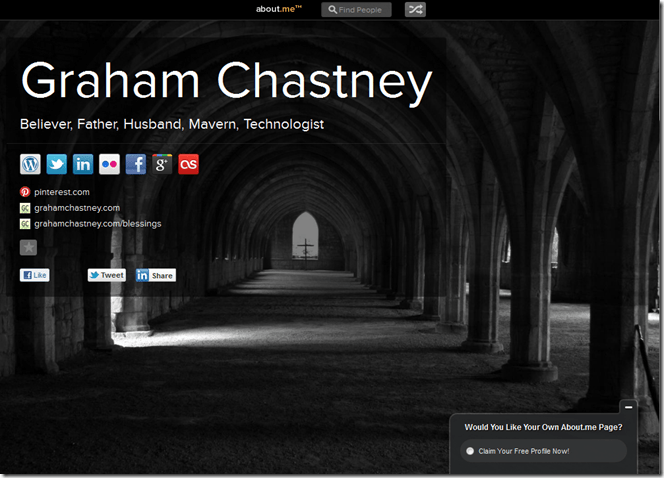
I’m currently using About.me for the purpose of linking people to the things that I am currently contributing to. At the top level it’s a really simple concept, I like to think of it as an online business card. What I mean by this is that it’s a single page that says something about who I am and gives information on how to get in contact. It doesn’t get a lot of visitors, but it gets enough for me to regard it as important, fortunately it barely takes any housekeeping.

image

My Tools: CrashPlan

Like many families the Chastney’s are producing data at a formidable rate. I have a son who edits music and a daughter who is into photography, add to that a reasonably sized music collection, my photographs and a bucket load of other documents and there’s over 150GB of important stuff. (Did I tell you about the days when we used to argue about people wanting 20MB hard disks (yes I did mean Mega Bytes)).

RydalThat’s where CrashPlan comes in by creating a safe remote continuous backup.

Getting all of this data copied to a location away from the house has always been an aim for a number of reasons. The main reason being that there are so many situations where a backup solution in the house wouldn’t be sufficient to protect it – fire, flood, etc.. There’s also the added advantage of being able to access data that you haven’t taken with you if you need to. CrashPlan Central provides a remote backup location that is always there to write to and to read from.

Another great thing about CrashPlan is that it doesn’t matter where the devices are. My son is at university and living away from home during term time. Because he has internet access all of his work is still backed-up and protected whether he’s at home or at university.

The CrashPlan agent runs all of the time on all of the devices and is continuously backing up the data. This means that we don’t really think about it making a backup it just happens.

We’ve had need to recover some files too and that works a treat also.

There are a number of other features of CrashPlan that are really good, but I don’t really use them.

The pricing is pretty good to. I use the CrashPlan+ Unlimited Family which covers the household for a few pounds a month.

My Tools: Evernote

The simplest way to describe Evernote is to call it a note taking and organisation tool, but that’s selling it a bit short.

Brockholes SunsetNote taking and collecting is incredibly important to the job that I do, and if that was all it did it would still  be very important.

I used to carry around all sorts of piles of paper. These comprised things I was reading, things I should be reading, thoughts, scribbles, diagrams, etc.. I still carry around a moleskin notepad which I use for taking notes in meetings, but for all of the other notes there’s Evernote.

My job involves me working with all sorts of pieces of information. Sometimes I need to read it, at other times I just need to know where it is for future reference. All of it goes into Evernote where it’s classified and organised.

One of the great things about Evernote is that it has been built from the ground as an internet application. It has client applications for all sorts of platforms, but these all replicate information with the central service.

I’ve also introduced it to my son who is studying at University and it works well for him too, quite frankly I’m a bit surprised that it isn’t promoted more by educational establishments

I’m not going to say much more because I really need to write a post about the ways that I process information and the way in which I use a number of different tools to collect, filter and organise. Evernote is a big part of that, but it’s only part of the journey.

You Can Find Me Here: Flickr

I’ve decided to start another mini-series. It’s a bit like the My Tools series from a while ago, but this time I’m going to focus on the various locations where I project some of my social persona.

The first one is Flickr where I project the photographer Graham.

Jimmy and Granddad visit ButtermereI’ve used Flickr for a long while now, my first picture was posted on 9th December 2009, and it’s still one of my favourite pictures.

In my view it’s still the best photo social site.

Other social sites, like Facebook, do photos but they aren’t really focussed around the pictures, they are focussed on providing a photographic record of an event alongside other records of the event.

Flickr is focussed on the photo itself – where it was taken, when it was taken, what it’s showing, what it was taken with, how it was taken. With that in mind I tend to use Flickr for certain types of pictures.

I don’t, for instance, put pictures of the family on Flickr. Most pictures are of scenes or objects, Jimmy and Granddad are a particular favourite for many. I suppose that you might call them the arty photos.

I make most pictures quite open with Creative Commons licenses. Flickr is, in my view, there for sharing.

The Flickr Organiser is a work of genius which allow you to do all sorts of things with the pictures – adding them to groups, adding tags, adding maps, creating and manipulating sets; all in a rich graphical interface.

One of the elements I think needs a good deal of improvement are the maps and satellite images that are available for geotagging the photos. Many photogenic places aren’t near roads so a map isn’t much good, and the satellite images don’t allow you to zoom in close enough. Perhaps Yahoo should leverage it’s recent relationship with Bing to get their images.

That aside, I am a real fan of Flickr. It’s nicely social and I get some good feedback on pictures. People have contacted me to use pictures in professional material in line with the Creative Commons licensing, and I’ve granted it.

Buttermere SwimmingI like to interact with other people’s pictures, there are some inspirational photographers out there. There are also a set of photograph archives which I really enjoy too. The Preston Digital Archive is a great insight into the place where I live.

The Flickr statistics tell me some interesting things too, although I’d still regard myself as being in the long tail my pictures have been seen 165,000 times which is a reasonable number.

So that’s my photographic persona ready for social interaction.

The Conversation Prism V3

An update to the Conversation Prism Infograph.

Chatworth with the FamilyThe prism shows 28 different categories of technologies that support the current complex set of conversations that we all have, everything from Wiki to Streams and Social Commerce to sCRM.

As someone who works within the corporate IT world there are a number of very prominent organisations we barely feature , or don’t feature at all: Microsoft, Oracle, HP, SAP. The high levels of choice also shows that we are a long way from many of these capabilities becoming universal, and for some even mainstream.

I’m also sure that we’ll see some of these capabilities collapse into other capabilities. There’s also a massive difference between wide adoption and deep adoption. Anyone who assumes that just because they are using Facebook for 2 hours a day means that everyone else is – is mistaken.

My Tools: WordPress for BlackBerry

It’s not often that I write blog posts while I’m mobile. If I’m going to write anything I’ll normally twitter. But there are times when a thought comes to me that is more than a tweet and is worth writing there and then rather than waiting until I am home.
It’s not always a good thing to be too immediate about things, but there is a time and place for it. It’s at those times that I turn to WordPress for Blackberry, and to prove the point I’m using it right now.
If I got more comments I’d probably also use it for keeping up to speed with the stream.
We have only just started the mobile revolution even. We’ve been working at it for some time now. In years to come we will do things while we are mobile that we can only imagine today. The devices that we have today are going to change radically as the computing power, storage and connectivity capabilities accelerate.
Writing a few words into a simple app might not be that radical, but it’s a signpost of the things that are to come.