
I could spend hours doing this… 2017 edition.

Over 8 years ago I wrote a piece entitled I could spend hours doing this… which outlined 14 steps to fritter away a few unproductive hours in the day. There’s been a lot of technical change since then, so I figured it was time to provide an updated guide.

The range of options have exploded, so where to start?

  1. Pick up your smartphone and check the notifications on there. Let them take you wherever they want to lead you. Mine first interesting notification for today happens to be an article on Medium so that’s where I go. Feel free to go wherever your’s takes you.
  2. At the bottom of the Medium article there is a range of more stories begging for my attention, but I choose to click on the arrow at the top of the screen which takes me to the list of articles that Medium has decided may be of interest to me.
  3. Ironically the second set of Medium articles are all within the Productivity section – 43 Bluepoints on productivity followed by 12 Productivity Hacks to Get Stuff Done are today’s favourite diversions. Lists are easy to consume and just as easy to forget. Bulletpoint 42 was a highlight: “Fac, si facis. That’s Latin for “Do it, if you’re going to do it.””
  4. From Medium it’s time to switch over to Flipboard, I’m not sure what the trigger was for this switch, but I’m freewheeling so anywhere is acceptable. Flipboard has an endless stream of articles so there’s little chance of running out of things to read. You can even read about the same thing from multiple sources if you want to get the same perspective from different people.
  5. Having spent some time on my smartphone it’s probably about the right time to switch devices particularly as that small screen and poor posture aren’t very good for me. Switching devices is another way of simulating that feeling of getting things done without having to actually do anything. Using multiple devices makes me feel busier, especially if I set up notifications on each of them.
  6. The switch to a different device need not precipitate a change of diversion, but there are plenty to choose from, so why not. Time to make the move to LinkedIn.
  7. LinkedIn is chocked full of distraction, you don’t need to venture very far from the home page, but if you do have some notifications that increases the goodness. Where are all those people I used to work with now? Who’s got a work anniversary? Who’s started a new position? Who’s posting corporately defined marketing material? Who’s liking corporate marketing material? Who’s commenting on an article? Not many of them. Who’s posted something from Medium? I could return to the top of the list at any time but decide, instead to move on.
  8. What’s up next? Twitter? You need to check both LinkedIn and Twitter because they are different constituencies. The stream of updates from Twitter can take me practically anywhere as long as I am following enough people and don’t set up any form of filtering. Following some news accounts and I’ll have fresh content all day, no need to get something done when you can live in the flow. But eventually, I get bored of Twitter and need to move onto another source.
  9. Blog posts are still, for me, the main source of information and for that I use Feedly. Feedly nicely goes around the internet and collects all of the blog posts, from all of the feeds that you’ve asked it to browse. Pick the right set of feeds and I’ve got a fresh crop of material every day and throughout the day. I can even point Feedly at Medium feeds and keep going around that circle as often as I like.
  10. I don’t know whether you’ve noticed, but I’m avoiding email. No need to worry though, there are still plenty of sources to go to. Slack is your next distraction for me. It’s time to look through the various communities and channels for more sources of distraction. Hopefully there’s a discussion ongoing somewhere that I can read through. If I’m fortunate someone in the organisation has set up a bot to scrape data from somewhere else into Slack, even more information to read through.
  11. In the modern workplace Slack isn’t the only port for collaboration distractions, if you are fortunate you’ve also got Yammer. There’s likely to be a discussion somewhere on Yammer that’s getting everyone heated about something wonderfully trivial.
  12. In the modern workplace Slack and Yammer aren’t the only ports for collaboration distractions, if you are fortunate you’ve also got Workplace by Facebook. Someone will have helpfully cross posted some of the content from each of the alternatives into each of the other alternatives. There are a nice collection of notifications waiting for my attention.
  13. In the modern workplace Slack, Yammer and Workplace by Facebook aren’t the only ports for collaboration distractions, if you are fortunate you’ve also got Microsoft Teams. I need to check all of the sources, because I don’t want to miss out on something important.
  14. To get another view of the work that others are doing there’s also Microsoft Office Delve. Delve will shows me a view of all of the important interactions going on in my network.
  15. I suppose that it’s time to check some email, but perhaps I should start with my personal email. If you are looking for further distraction the best way is to read personal emails on your smartphone. Hopefully you will receive a notification from one of the other apps on your smartphone to take you off exploring somewhere else.
  16. While I’m on my smartphone perhaps I should check one of the news apps that’s on there, I wouldn’t want to miss out on anything important.
  17. Hopefully, by this time, I’ve received a number of messages via the numerous messaging platforms that I’m subscribed to. I need to check each one because I never know what I may have missed.
  18. But then I really should check my work email. If you want to be really distracted don’t use any of the capabilities within your chosen email product and wade through each and every email, including the emails which are notifications from Twitter, Yammer, Workplace, etc.
  19. Randomly return to a step and restart the cycle from there.

Have I missed anything?

Outsourcing our Brain and the impact of SatNav

On Tuesday this week the Guardian wrote an article with the title: “All mapped out? Using satnav ‘switches off’ parts of the brain, study suggests”

This article was reporting on a study that was investigating the processes that the brain uses when mapping our environment and planning routes. The headlines emphasises that when we are receiving instructions our brain turns off many of these processes:

The study found that characteristic brain activity linked to simulating the different possible routes for a journey appears to be entirely absent when a person is following directions rather than independently planning a route.

The brain is quite good at not doing things it doesn’t need to do, but that has consequences.

Having read through the article I thought to myself that this would make a really interesting extension to an article that I had previously written on outsourcing our brain functions.

The basic idea of the post was that we use tools to outsource our brain functions and in so doing we risk reducing our brain function. By not exercising the brain capabilities we find ourselves in the place where we are dependent upon the tools and struggle to function without them. A basic example of this is the ability to do mental maths which, on my own unscientific assessment, is completely missing from the younger generation that has always had a machine to do this arithmetic for them. Another example is the memory of phone numbers which people no longer need to do; if you’ve given me your phone number in the last 5 years I probably don’t know it, I still know numbers prior to that time. This time coincides with increased use of mobile phones and no longer needing to know the number to call someone.

So where is the link to the post that I wrote?

I searched this blog for the post.

I searched Google for the post.

I searched my Evernote for this post.

I couldn’t find the post.

Without one of these tools telling me where this post is I’m stuck. Having outsourced that part of my memory I’m completely dependent upon them.

The irony wasn’t lost on me.

Do you have a wandering mind? It’s probably making you unhappy.

The other day we revisited the subject of multi-tasking and I talked about a few ways I try to remain focused. Focus isn’t just important for productivity, it’s also a core competency for happiness.

Back in 2010 Matthew A. Killingsworth and Daniel T. Gilbert published a scientific paper titled: A Wandering Mind Is an Unhappy Mind.

We developed a smartphone technology to sample people’s ongoing thoughts, feelings, and actions and found (i) that people are thinking about what is not happening almost as often as they are thinking about what is and (ii) found that doing so typically makes them unhappy.

Let me say that a different way: spending your life thinking about things that aren’t happening is making you unhappy. You would be happier if you focused on the here and now.

So much of the multi-tasking that we do is an attempt to switch between multiple things that aren’t happening, it’s a type of active mind-wandering. How many times do we check our social media to see if something is happening only to be reminded that nothing is happening. How many times have you refreshed your social media site only to refresh it again, and then again without even thinking. The research tells us that this is making us unhappy.

Below is Matt Killingworth talking through his work at TEDx:

Matt also talked through his findings on the TED Radio Hour in 2014.

Dilbert: “Does your job description tell you to attend meetings that are worthless?”

Meetings should be the most engaging, uplifting, empowering time in the working day but all too often this is the scenario:

Productivity and Laziness: Is it time to cultivate laziness as a skill?

There’s a hugely popular mantra in all productivity schemes:

Work smarter not harder

Every time I hear this phrase I want to replace it with a different phrase:

What’s the lazy way of doing this?

Smart working is really, let’s face it, lazy working.

Laziness may not be the first word that springs to mind when you think about productivity, but you should embrace it as your friend.

Think about it, we do all sorts of lazy things to make us more productive.

Whenever you ride a bike rather than walking somewhere you are being lazy. It might not feel like it, but the bike gets you there quicker and takes you further than you could go without it. It’s lazy to ride the bike.

If you are using a phone to talk to someone you are being lazy. It’s easier than travelling to where that person is to talk to them (unless they are sat next to you).

Lazy people are constantly asking “why should I bother?” That’s a great productivity question, remember:

“There is nothing so useless as doing efficiently that which should not be done at all.” Peter Drucker

I’ve seen countless business processes that add no value and were best ignored. Lazy people ignore these processes.

Lazy people experiment with doing things in different ways to see if they take more, or less, effort – they stick with the one that takes less effort.

We are surrounded by an increasing number of automation techniques, particularly in IT, yet I see people endlessly doing the same repetitive tasks. Lazy people let the machines do it for them.

I think that more of us should cultivate laziness as a skill.

"Tech is the new perk" according to Adobe Future of Work Survey 2016

Eighty-one percent of U.S. office workers say state of the art technology is important at work, outranking food and beverages (72%), a beautiful office design (61%) and on-site amenities (56).

Only one in four (26%) of U.S. office workers believes that their company’s technology is “ahead of the curve.” Indians are slightly more bullish (30%) while the U.K. is especially pessimistic (15%).

In the U.S., those who said their company’s technology is “ahead of the curve” love their work about twice as much and feel about twice as creative, motivated and valued compared to those at “behind the times” companies.

These are some of the findings from Adobe’s Future of Work Survey for 2016. The survey results were published in May 2016 under the title: Work in Progress encapsulating contributions from over 2000 workers from U.S., U.K. and India who use a computer daily for work.

One of the significant conclusions of this report, in Adobe’s words, is that “Tech is the new perk”. People would rather have good technology than access to food and beverage, lounge and relaxation areas, personalised workstations, beautiful office design and access to on-site amenities. This isn’t quite true across the three nations surveyed – in the U.K. we regard access to food and beverage as highly as we do technology.

These figures aren’t surprising in a world were we increasingly rely on technology to do our work. Personally I wouldn’t rank tech alongside perks at all, for many jobs that would be like classifying a van as a perk for a delivery person. Having the right level of technology is essential to doing a good job and doing a good job is a significant factor in most people’s job satisfaction. The problem is, we often expect people to do a good job without the right technology which is a bit like expecting a delivery person to carry a 3 tonne load in a 1 tonne truck. It’s not surprising that people in organisations with “ahead of the curve” technology feel more creative, motivated and valued – they probably are.

Personal "temperature bubbles" – Yes please

Like many people who sit in open plan offices one of the most contentious issues is temperature. I’m always hot; that’s who I am. Others are always cold; that’s who they are. It’s difficult to do anything about that in a place where we all share the same air.

Comfort in a working space is greatly influenced by temperature and comfort greatly influences people’s productivity.

I’ve always wondered whether there was a better, more personal, way of dealing with different people’s temperature preferences.

Design firm Carlo Ratti Associati are try a better way at the Agnelli Foundation headquarters in Torino, Italy. By combining sensors and IoT technology with the air-conditioning system they are aiming to create personal “temperature bubbles”:

It will also add an important layer of personalisation through so-called “temperature bubbles” that workers will be able to set with a smartphone app that speaks to fan units in the ceiling. “Your own personal [temperature] setting will follow you through the building,” he said.

Mashable: This high tech office will give everyone their own thermal bubble

Yes, please! That’s all I’d like to say.

Human Behaviour, a Printer and a Ream of Paper

Today I went to the large multi-function-printer in the corner of the office expecting to pick up some printing that I’d just sent to it.

(You might be wondering what I was doing printing, but that’s a question for another day.)

I was expecting to be greeted by a set of pages on the side of the printer, but instead I was greeted by a red-light and a message on the screen.

The message told me in very clear terms that the printer was out of paper. This particular printer has four trays, three of which are dedicated to the type of A4 paper that I wanted to use, all three of these trays were empty.

Being a good office citizen I opened the cupboard next to the printer where the spare paper is stored. Having open the cupboard I was accosted by a sight I’ve seen in every office I’ve ever worked in. Instead of the cupboard containing full reams of paper it was littered with ripped open paper wrappings containing loose collections of paper. Some of these collections had barely 50 sheets in them, some a 100 sheets, but all of them less than half a ream of paper. There were so many bits of reams that I couldn’t see the full reams.

Most home printers only take a few sheets of paper, but for some years now, decades even, designers of office printers have understood something quite basic. These design geniuses have understood that the basic design requirement for a printer tray is that it takes a ream of paper. I don’t think I’ve seen a paper tray that takes part of a ream for a very, very long time. Yet, despite this being obvious to the designers of printer trays it’s clearly not obvious to the users of printer trays. What could be simpler:

  • Open paper tray
  • Remove ream of paper from cupboard
  • Remove wrapping from ream of paper
  • Put full ream of paper in paper tray
  • Close paper tray
  • Dispose of wrapping

Instead people prefer, for some reason, a different process:

  • Open paper tray
  • Remove ream of paper from cupboard
  • Open wrapping covering ream of paper
  • Remove a handful of paper from wrapping
  • Place this portion of paper into paper tray
  • Place partial ream of paper back into cupboard
  • Close paper tray

The only logical conclusions I can think of for this behaviour are as follows:

  • People haven’t understood, even after all this time, that the paper tray can take a full ream of paper.
  • Disposing of the paper wrapping around a ream of paper requires such special skills that this step is to be avoided. Possible, but I’ve not come across it.

I wonder what the designers of paper trays think about this situation. They’ve done the design work, they’ve created an optimised solution, and yet people prefer to work in a way that creates extra work.

This silly little example shows to me the difficulty of adjusting human behaviour. Even when there is an obviously simpler way of doing things we prefer to follow the tried and trusted path. We prefer to put too little paper in the printer because we are afraid that putting too much in it might break it. This is just a tiny example, but there is evidence of this type of behaviour everywhere you look. The challenge that many organisations face is that these tiny examples scale up into huge areas of inefficiency.

How I process information (2015 update)

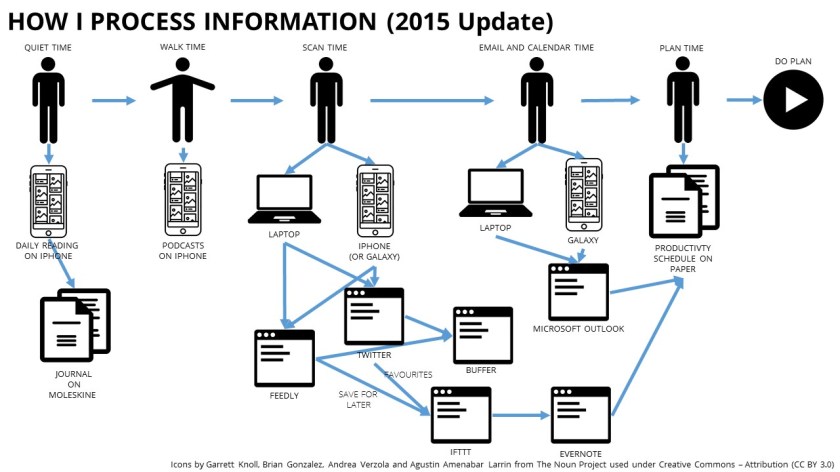
Back in February I wrote a post called How I process information (normally). This is an update to that post with a few tool changes and a few activity changes. I tinker around with my own personal productivity on a regular basis constantly seeking something that fits the demands being placed on me and my personal style, this is the latest iteration of that tinkering. Updates are in italics.


One part of my job is to stay current with the ever-changing technology and business landscapes. This means that I process hundreds (probably thousands) of items of information every day.

I don’t read all of them, but I try to process all of them on a normal day. It should be noted here that I try to have normal days as often as possible, but there are many days when that’s not possible. On those many days I do what I can to keep the framework working.

how-i-process-information-2015-update

The normal way that I process information focusses on mornings. I’m mostly a morning person so that’s the best time for me to be alert because processing lots of information you should do when half asleep.

The morning is also the best time, for me, to establish and work through a routine. My morning routine works in six phases:

  • Quiet Time – when I read something that is meaningful normally using an application on my iPhone. I’ll then journal about this into a moleskine notebook.
  • Walk Time – I try to start each day with at least 40 minutes walking. During this time I’ll listen to a podcast on my iPhone. I’ve moved from using the inbuilt podcast application to using overcast it has a few nice features that I like (specifically an easy skip forward capability), but also the inbuilt podcast application ran into a problem and I couldn’t get it working..
  • Scan Time – I will work my way through the overnight deluge of blogs via Feedly and all the interesting updates from Twitter. My focus on Twitter is a set of people I have in a list called Interesting, I am likely to scan through the first few tweets from the rest of the people who I follow but not always. In Feedly I’ll mark some items as Save for Later; in Twitter I’ll Favourite some tweets. Both the favourited tweets and the saved Feedly posts will get copied into Evernote via IFTTT. During scan time I’ll also add a few things to a Buffer queue to get posted on Twitter (and Facebook) during the day, or the next day. Buffer allows me to space out posts so that they don’t all get blurted out in the first hours of the day.
  • Email and Calendar Time – I try to limit the time I spend on work emails. The part that I do in the morning routine is to get to inbox-zero by moving items into one of two folders – Actioned or To ActionIn 2015 we have moved our email services over to Outlook based on Office 365. After more years than I care to mention on Lotus Notes I’ve found the change over to Outlook relatively painless, but I have used Outlook in other aspects of life and for some customer projects so it wasn’t completely alien.
  • Plan Time – I have a physical folder with pre-printed Productivity Schedules in it. I’ll fill one of these out for each day. This becomes my plan for the day, it isn’t a task list it’s more than that, I’ll write about it some time.

It’s worth noting that there is only one application in these phases that is provided by my employer; the rest are either free, or I pay for them, this is my personal productivity regime.

Having written this post I realise that I’m still a bit delinquent on posts for the My Tools series; time to do some catching up.

A number of colleagues have written something similar:

Icons by Garrett Knoll, Brian Gonzalez, Andrea Verzola and Agustin Amenabar Larrin from The Noun Project used under Creative Commons – Attribution (CC BY 3.0)

Handle it once! Getting back to Inbox Zero.

Like many people I get a significant amount of junk-mail through the letterbox every week. Most of the time the junk-mail goes straight from the floor below the letterbox into a dedicated rubbish box near the door where it rests temporarily before going outside into the recycling bin. There is minimum effort expended on these pieces of brightly coloured paper.

The useful items of post will get filtered out and go onto a desk in a room near to the letterbox. Quite often these pieces of post will get opened and quickly looked at during the filtering process, sometimes they’ll even get taken out of the envelope before they get put onto the desk. At some point someone will sit down with the various items of correspondence and make a decision on the next step they should take.

Nearly all the post that isn’t junk-mail will get handled twice, some of it will get handled multiple times. Sometimes it’s inevitable that things get handled more than once, but the reality is, most of it only needed to be handled once and then dealt with.

Last week I looked at my email inbox and realised that it was a mess, but I couldn’t understand why, so I watched what I was doing. Once I became aware of it I realised what was causing the mess – I was opening emails, skim reading them and then closing them, leaving them in my inbox.  My normal method of processing information (I need to update that post because it’s changed) had lapsed and my inbox-zero routine had fallen by the wayside.

My inbox-zero approach goes as follows:

  • On a periodic basis (avoiding continuous sorting)
  • Start at the top of the inbox
  • Open the first email start to read through it and spend 10 to 15 seconds understanding it.
  • If the email can be responded to in less than a couple of minutes, respond and file under done.
  • If the email is going to take longer file under to-do.
  • Open the next email.
  • Repeat until mailbox is empty.

I have a set of keyboard short-cuts set up to do the filing. In this way most email is only handled once and it’s only the items that need a longer activity that are handled multiple times. The items that need to be worked on are visible and the clutter is reduced.

This week I will be re-instigating my inbox-zero approach to handle things as few times as possible.

"Performance ratings data within companies is all bogus"

Most of my exercise is accompanied by podcasts. Whether I’m out for a walk or in the gym I’m likely to have someone speaking in my ears.

This morning something went “YES!!!” in my head when I heard these words:

“Performance ratings data inside companies is all bogus. It doesn’t actually measure what it says it’s measuring. Which, of course, is hugely problematic because we end up promoting people, and paying people, and training people, and deploying people based on those rating data and they’re invalid.  “

These are the words of Marcus Buckingham speaking on The Future of Work Podcast in which Jacob Morgan.

Sometimes you hear something and you know intuitively that there’s something significant about it, and that’s what happened to me this morning.

I’ve been subject to a number of rating systems in my time, some of them with forced bell curves others not; some of them have had a few points of assessment others with many areas of assessment. These assessments have always been done on an annual basis with the occasional mid-term review. None of them have made a significant difference to what I’ve done day-to-day and they’ve all felt like they were being done to tick-a-box for the corporation. I’ve always been diligent in ticking that box because the numbers in the assessment have made a difference to the money in my pocket but little else.

There have been a number of high profile organisations switching away from these systems:

Marcus’ own article also cited Deloitte – Reinventing Performance Management.

The Performance Review systems that I’ve experienced tend to link together development and reward. Often they are the only conversation about development and reward that an employee has with their manager. Everyone knows that this shouldn’t be the case, but it’s what happens.  I can’t remember a time when a Performance Review has resulted in a change of my Development Priorities. The times that I’ve developed the most have always been whilst working for an effective team leader, hence some other words from the podcast resonated:

“I strongly suggest the future of work should be built around the practices of what the best team leaders do anyway, and they do not do a one every six-week conversation…what they do do is check in with each person each week about the work, it starts with the work.” Marcus Buckingham

We may not be in a position to change the performance rating system, but we can all make a different to people’s development in the places where we lead.

I like Marcus’ principle of 5 minutes to tell me about 5 things for the next 5 days.

Attention Management – 'Being “always on” hurts results'

Early in my career I was sent on a time management course. In it I was shown how to draw up to-do lists and how to priorities them against two criteria – importance and urgency. Further coaching was given on how to review the to-do list at the end of every day in order to set the correct activities for the following day.

At that time the constraint was perceived to be time, you started work at a set time in the morning (8:00am for me) and you finished at a set time (17:00 for me), your job was to get the important (and urgent) things done in that time. Time was the constraint, so it was time that needed managing.

Then along came the internet, email and the blackberry. Time was no longer the constraint, but we failed to recognise it and we still work as if it was.

Attention became the new constraint and we completely missed it. We thought we had been liberated from time and that we could now work in the Martini advert (any-time, any-place, anywhere), but we were kidding ourselves.

As we spread our attention across the 24 hours of each day we failed to notice that we were laying it down in ever thinning layers. The speed increased, but the quality decreased.

The late-night email culture is the primary example of this. In a recent HBR article Maura Thomas highlights the risks of the phenomena – Your Late-Night Emails Are Hurting Your Team.

Around 11 p.m. one night, you realize there’s a key step your team needs to take on a current project. So, you dash off an email to the team members while you’re thinking about it.

No time like the present, right?

Wrong. As a productivity trainer specializing in attention management, I’ve seen over the past decade how after-hours emails speed up corporate cultures — and that, in turn, chips away at creativity, innovation, and true productivity.

If this is a common behavior for you, you’re missing the opportunity to get some distance from work — distance that’s critical to the fresh perspective you need as the leader. And, when the boss is working, the team feels like they should be working.

Now that time is not the primary constraint, and attention is, we need to start developing a new set of working protocols to manage this precious resource.

Do you have any techniques you use to manage your attention?