BYOD and the Data Strategy

A quick recap of where we’ve got to in this discussion on BYOD over recent weeks.

The Forbidden CornerI started this discussion because I was interested in the statistics that supported BYOD and it’s impact on productivity. My conclusion was that people instinctively felt that there was a productivity benefit and surveys support it, but there is little hard evidence, and lots of repeated evidence. The primarily benefit stated for BYOD through enabling mobility within the workforce. I received some feedback from people suggesting that the productivity benefit from mobility was only part of the story and that the value was far broader. While reading articles in this area I also came across a number of people focussing on the risks of BYOD many of them from security and virtualisation software vendors.

To bring my thoughts together I created a Concept Map showing what I’d collected to date.

The concept map got me thinking about some of the challenges particularly in the area of personal knowledge management in a BYOD world.

One of the ways that people cover off the risk element is to utilise a Choose Your Own Device (CYOD) approach, actually Forrester made some statements about BYOD being killed off because of this approach. I’m sceptical of the CYOD approach.

My own view is more aligned to that stated by Gartner that BYOD is really an application strategy.

To have a workable applications strategy you also need to have a data strategy and that’s the thought behind this post.

In an interview with the BCS in 2006 Tim Berners-Lee said this:

Customers need to be given control of their own data – not being tied into a certain manufacturer so that when there are problems they are always obliged to go back to them. IT professionals have a responsibility to understand the use of standards and the importance of making Web applications that work with any kind of device.

They need to take the view that data is a precious thing and will last longer than the systems themselves.

Tim Berners-Lee

This challenge was written to IT professionals like myself, and it’s a challenge that we often get disconnected from. We get so wrapped up in storage, compute, networks, operating system, utilities, security, devices and applications that we forget that it’s the data where the value is.

As we create more and more data from an exploding pool of sources we have the ability to derive increasing value from that data. Applications help us to mine and to visualise the data, but it’s the data that is precious. In simple terms, it’s not Excel that gives the value to the spreadsheet, it’s the insights that the data gives.

The opportunity and the challenge of a BYOD world is to think about all of the new ways of using data and to build a rich strategy and a set of operating processes that gain the best value.

The traditional approach for organisations has been to build a network castle and to make sure that all of the data stays inside that castle. In a world where there is massively more data of better value outside the castle walls that approach no longer makes sense.

Data being worked outside an organisation’s control is not always a bad thing, likewise data being worked inside an organisation is not always a good thing. Often the best thing that you can do is to work the data completely in the open and participate in the community.

Organisations and individuals need to think through their approach to data in this new context. Here are some areas where a shift in thinking is required:

Ownership

Modern intellectual property law is vast and complex including patents, copyright, authors’ rights, trademarks and even database rights.

Join any organisation and you’ll be asked to sign a contract that makes a claim over the material that you create. Post pictures to Facebook, Twitter, Instagram or Flickr and each one will make a claim about the ownership of the data posted in their terms of use. When Instagram changed their terms of use in 2012 there was an outcry and the changes were soon reversed. Many people feel the need to put a caveat on their Twitter profile to assert that the views expressed are their own.

Alongside these systems other open systems have been created, such as creative commons, for those wanting to take a more collaborative approach.

Organisations and individuals need to think through their strategy for data ownership. If an individual can create personal data and organisation data how do you measure which is which. It’s no longer adequate to define the ownership of data by the location where it was created or the time of day when it was updated. What data should be placed into the public arena with open ownership? What data should be retained inside a personal or organisational boundary? Relinquishing controlling ownership of data and letting it be used by others may be more valuable than placing it behind a locked door.

Protection

Once you’ve worked out the strategy for data ownership organisations and individuals need to think about how they are going to protect it. What is an appropriate level of protection? What data are others going to be able to modify? What about organisation data on a personal device, what is the appropriate level of protection? The most appropriate answer to this may be to put no protection in place.

Integration

How is the data going to be integrated with other data? Value is often derived from joining pieces of information together but that’s only possible if the ownership and protection of the data allows it.

There’s going to be some interesting opportunities and challenges working across the personal and organisation boundaries.

My friend Stu Downes has recently written about Personal Digital Assistants and the challenge that they are going to create.

Availability

How does an organisation or individual ensure that the data will always be available?

If you store your diary in a free cloud service what guarantees have you got that it’s still going to be available in 6 months time, but more importantly, how can you get your data out and put it somewhere else?

If someone squirrels the organisation data away into a privately owned file store how can the organisation ensure that it has access to it in the future should it be needed?

Integrity

As you see the value of sharing data in the public arena and let others contribute to it, how do you ensure data integrity? Take Wikipedia as an example, for the most part working in the public arena has resulted in a highly valuable asset, but the small number of errors creates a huge integrity problem. If you publish an organisation’s information into the public arena how can someone consuming it be confident in its integrity?

Integrity has been a problem for file stores for a very long time. How do you know that the file in use is the current file? If someone is working on a BYOD device how can you ensure that they’ve got access to the current file and hence the current data?

Another integrity challenge is the reference-ability of data. What is the real source of the data? Does the source have integrity?

Retention and Legal Hold

How does an organisation ensure that it has retained the right amount of data for legal purposes? How do you even define what needs to be retained and build a defensible system of control?

How do you place data that’s on a personal device under legal hold? How do you place files in a personal cloud file store under legal hold?

Life-cycle

There are a number of life-cycle challenges to data. How does someone know that the data being used is the current data? If data has been superseded by other data how does someone know, especially if it’s being integrated into other data?

Does the ownership of data change as it goes through its life? Can it transition from being personal data to being organisation data? Can it transition from being protected within the organisation to being placed in the public arena?

Lots of questions that people are wrestling with every day, or openly ignoring. I suspect that there are more on the ignoring side than on the wrestling side though.

Johnny Cash's To-Do List

I have a love-hate relationship with to-do lists. I know that when I’m working the list I’m more efficient, but it also feels too restrictive a bit like working on a treadmill.

My current practice is to use a hybrid productivity schedule which includes a to-do list which I’m planning to write about at a later date when I’ve worked it for more than a couple of weeks. So far it’s working quite well.

While thinking about it though I came across a to-do list that apparently belongs to Johnny Cash which I quite like:

Via Fast Company & Lists of Note


Bring Your Own Device (BYOD) v Choose Your Own Device (CYOD)

IDC’s top prediction for 2014 in Asia-Pacific is this (according to ZDNet):

“Death” of BYOD, birth of CYOD

So what’s the difference between bringing and choosing? Whether I purchase my iPhone or Samsung Galaxy S4, or my employer does, what’s the difference?

Wintry Walk on Fare Snape Fell

This is what IDC are reported to have said in ZDNet:*

“I hate to be the bearer of bad news but one thing is that BYOD doesn’t have a great [return on investment] ROI, there isn’t one,” said Charles Anderson, head of telecoms and mobility for IDC Asia-Pacific. He was speaking as a panelist at the research agency’s event, which highlighted CYOD as one of 10 key trends for next year.

Anderson pointed out there were also costs associated with supporting users, devices, security when accomodating BYOD. Beyond mobilizing a person, there was little value in that, he added. “These people are going to bring their devices into the enterprise and what are they going to do with them? You give them access to e-mail, but they’re already at work, so they probably have access to e-mail already.”

And:

“What CYOD is really about, it’s IT regaining some of that control and securing applications, and delivering tangible business benefits,” explained Anderson.

Those are certainly interesting views, ones which I’ve heard a number of times, but I think that they miss the point of BYOD.

The difference between BYOD and CYOD is not just about sourcing. The point of a CYOD approach is that it’s really a return to the managed environment. It’s a choice between managed Android, managed iOS, managed Windows and/or managed OSX. In some cases it might even include a managed Linux. But, as the report on the IDC event points out it’s about “IT regaining control and securing applications”.

In the BYOD Concept Map that I put together I included CYOD as a leg off the “creates concerns about” side. Security and business impact are a concern and so you create an envelope that reduces that concern, an envelope of management, an envelope of restriction and control. But you are under pressure to give some choice, so you let people choose from a limited subset of devices and operating systems.

I can fully understand why businesses want to do that. You want people to focus on work and hence you want to control the set of applications that they have access to because you don’t want the situation where (as it says in the ZDNet report) “people were basically watching YouTube videos all day long”. Likewise, you want to secure your data, so you want to limit the places where it can go. We’ve tried these approaches before to combat these very same problems, and they don’t really work, they give the vernier of working.

Beyond my view that these types of control don’t really work I also think that the CYOD approach misses some significant concepts of BYOD:

The first concept that I think that CYOD overlooks is where the value of BYOD is coming from. There is huge value in making people more mobile which both CYOD and BYOD enable; beyond that, and probably more significantly, the value of BYOD comes from the innovation and productivity advantage of choice itself. It’s not primarily the choice of device that drives that value; it’s the choice of applications. You’re not going to see that value expressed on any device TCO calculation, or even in an ROI calculation for the capability, but that’s where the value is coming from.

The second concept that I think that CYOD is overlooking is that of the changing culture. All of the millennial digital natives out there are going to begrudgingly choose their device and also utilise their own personal device. They’ll use whichever device they need to in order to get the job done, but their first choice will be their personal device over which they have full choice. The company provided CYOD device with limited choice will only be used when it needs to be.

Some people will be happy with a CYOD approach, it may well be the best choice for the current majority workforce, but it’s an interim half-way house much like private cloud is a transitional approach.

Now, I do have to acknowledge that I’m speaking from a Western European perspective with significant insight into the North America market, so perhaps things are radically different in Asia-Pacific where this prediction was specifically aimed.

Rather than the “death” of BYOD it’s my view that we’ve barely seen the start of a dramatic shift in the ways that we work and even what we call work.

Hat-tip to Matt for highlighting this report to me.

* I’d normally try to read the original source report, in this case from IDC, but I’ve not been able to find it, even though I have access to IDC reports.

BYOD and Personal Knowledge Management

Not so long ago people would go to work at a set time and work exclusively on equipment and applications provided by the employer. At the end of the day they would go home and do whatever they wanted to do using their stuff. But now the line between work and life is now a complete jumble for many.

Wintry Walk on Fare Snape Fell(I am going to refer to work-and-life in this post as if they are two distinct things as a way of contrasting the challenge, but that whole concept is also going through significant disruption which I may cover at a later date)

Personal knowledge management used to be similarly straightforward with work stuff in one place, life stuff in another place. Take diaries as an example, I used to run a home diary and a work diary. If truth be known, Sue used to run my home diary and I would focus all of my energy on the work diary. This situation was only complicated when either the work requirements or the life requirements would break into one of the other’s area. School plays during the day would require a special entry in my work diary to make sure I was there. Likewise overnight business trips would need a special entry in the life diary.

This situation was never ideal, but worked quite well with few issues. One of the huge advantages of this situation was the people at my employer could see my availability and schedule meetings with me because my availability was visible to all.

In a BYOD world it would be, just about, acceptable to make both my diaries available on all my devices, but that’s not really resolving the challenge or addressing the changing culture. Running multiple diaries has never been ideal and leads to all sorts of issues when things clash.

The real requirement is for me to see a single diary, I don’t mind whether it’s made up of a number of diaries, but I need to see it as one. That diary needs to be embedded into my mobile experience so that I can use all of the functions of my mobile device. Portions of my availability need to be visible to different interested groups. I need to be able to set parameters on my availability for those groups because I don’t want a completely blended lifestyle where I’m available to everyone 24 by 7. I want event information from one group (project team) to be available to another group (family) so that sensible decisions can be made. In other words I want a completely blended diary experience which has been personalised to my requirements and way of working.

I could just opt out and run a single personal diary with no visibility to others but that would not be very helpful to people who want to schedule time with me. I used to have a boss who did that and it was impossible to schedule anything with him, particularly as the only diary that he regarded as truth was the paper one in his hands at all times.

Another alternative is to run two diaries and to copy everything from one to another. The natural choice for doing this would be to make the life diary the master and to copy everything from the work diary into it, but that just leads to another challenge, what to do about data privacy. Would my employer really want my family to have access to a report with sensitive financial information in it? A diary entry isn’t just about the scheduling information; it’s also about all of the associated content.

My purpose in this discussion is to use diary information as an example of the complications of running any form of personal knowledge management system in a world where work technology and life technology are the same, and where the separation between them is a complete jumble. The same challenges apply to to-do lists, note taking, reading lists, document stores, and all manner of personal knowledge management techniques.

These challenges are multiplied when we want others to collaborate with us in our personal knowledge management system.

We are going to see many ways of resolving these challenges that break the current paradigms and move us to a far more personal way of working. Doodle is an example of a different way of thinking about team scheduling that works across personal diaries. There are many people thinking about the to-do list and note taking most of which are being delivered as cloud services built to interact with personal applications. This continued shift to personal is going to significantly change the way that individuals and teams interact, collaborate and do work. As always the technology shift is the smaller part of a much larger cultural shift.

As a person I’m the one who is enabled and approved for access to all sorts of data. In the future I am expecting to be able to have a personal life assistant which is going to need access to all of my sources of data to enact upon them, but that’s another challenge requiring another paradigm shift.

BYOD Concept Map (Version 1)

Continuing the theme of Bring Your Own Device (BYOD) I wanted to capture some of the thinking that was going on in my head.

One of the ways I use to bring my thoughts together are Concept Maps.

Here’s the one I produced for BYOD:

Bring Your Own Device Concept MapThese maps are useful because the highlight, challenge or re-enforce things. Here are some things I observed:

  • It re-enforced my view that it’s not really about the device hardware, or even the operating system. As such BYOD is not the correct name, but I’ll stick with it for now because that’s what others are using and it wouldn’t be the first thing that’s misnamed.
  • It highlighted the dangers of restrictive controls and their impact on the overall benefits of BYOD. If the real value is derived from personal choice and, in particular, application choice then restrictive controls that remove these freedoms crush the overall value.
  • It challenged my lack of thinking about the broader changing cultural. Are the millennial changing the way they work because technology is enabling it, or would that change be happening anyway? What is the best way of approaching different generations that work in different ways?
  • It also challenged my lack of thinking about the increased creativity and increased collaboration aspects.
  • It re-enforced my view that the high focus on operating system security is misplaced and we should really be focussing on applications and data, particularly the security of data when stored in data stores embedded in applications. What do you do when someone leaves an organisation? Is it no longer realistic to expect that they will remove all of the data that they have access to from their personal applications?

As with all Concept Maps it’s limited in scope and complexity to help in understanding, hence it’s a work-in-progress, but I’m calling it Version 1 because it’s good enough for now. Some of these things are likely to change as I think about them. I’m happy to be challenged on any of the elements within the map if you think it can be improved.

If you prefer a PDF of the map it’s here: Bring Your Own Device Concept Map.


BYOD and Productivity Statistics

Last week I started a discussions about BYOD and Productivity because there are lots of people claiming increased productivity from BYOD.

Global RainbowIntuitively I expect this to be correct. Allowing people to work in a way of their choosing, using a device of their choosing, ought to result in better productivity.

Part of the discussion in my previous post was difficulty in defining what productivity was for many job types, but still there ought to be some statistics to support the declaration of ‘increased productivity’ even if it’s only in some example work types? There are, after all, lots of people already doing it.

Search Google for BYOD increased productivity statistics gets a lot of results (about 42,800,000), so lots to get my teeth into:

BYOD increases productivity, but IT departments need to be prepared – Computer Weekly (2013-08-02):

 “Today’s businesses need a smarter, more mobile approach,” said Fergus Murphy, marketing director, client solution, Dell Europe. “If an organisation wishes to remain in a very competitive market, it needs to open its mind and broaden its perspectives.”

The Evolving Workforce Research report found that nearly 60% of employees feel work would be more enjoyable if they had a say in the technologies they used, while 60% feel they would be more productive with better IT resources.

This news article highlights a report from Dell which isn’t directly linked to, but I think it’s referring to this one. This is a report based on a survey of employees. There is reasonably good evidence in these surveys that people feel more productive in a BYOD context, but are they, what is the evidence for it? I’m always a bit sceptical of drawing conclusions from surveys of people’s perceptions. Perceptions are such a poor measure of reality.

One of the things that I do like about this report is the focus on productivity measures moving beyond being simply a function of hours worked. Hours are such a poor measure of productivity if productivity is a measure of the ratio of inputs and outputs.

The Financial Impact of BYOD – A Model of BYOD’s Benefits to Global Companies (pdf) – Cisco IBSG Horizons

To help companies determine the current and potential value of BYOD, Cisco IBSG conducted a detailed financial analysis of BYOD in six countries. Our findings show that, on average, BYOD is saving companies money and helping their employees become more productive. But the value companies currently derive from BYOD is dwarfed by the gains that would be possible if they were to implement BYOD more strategically.

This report is also, mainly, based on survey material but it also integrates real world experience. It also creates a classification system for quantifying the benefits:

  • In different productivity areas (availability, collaboration, efficiency, new ways of working, avoided distractions, reduced downtime, and reduced administration)
  • At different levels of maturity (no BYOD, basic BYOD, comprehensive BYOD)
  • For different work types (mobile employees moving from corporate devices to BYOD, mobile employees moving from corporate-paid data plans to employee-funded plans, etc.)
  • And different cost pools (software, support and training, etc.)

As highlighted in a previous post we need to be careful with the term BYOD, especially when it comes to productivity, because it’s not primarily about the device:

It is important to note that productivity improvements come from the device and the software, mobile apps, and cloud services used on these devices. BYOD-ers highly value the ability to use the applications and services of their choice, rather than being limited to what their companies offer.

This statement links to an endnote:

The top overall reason for BYOD, “Can get more done with my own device and applications,” combines the attributes “I can get more done with my own device (it’s faster / better / newer)” and “I can get more done with the software / mobile apps.”

These are the overall statistics:

BYOD-ers save an average of 37 minutes per week with BYOD as it is currently implemented in their companies. The United States leads by far in terms of current productivity gains per BYOD user, with 81 minutes per week, followed by the United Kingdom at 51 minutes. In both of these countries, BYOD-ers posted impressive gains by working more efficiently and being more available to their colleagues and managers.

Most of this benefit comes in the form of improved efficiency.

There are a set of workers surveyed who gain significantly higher productivity benefits of more than 4 hours. The report also has some words of caution on productivity as the other end of the spectrum:

One-quarter of current BYOD-ers would rather have a company-issued device. Moreover, percent of BYOD-ers are very unproductive using their own devices for work. These “problem BYOD-ers” average more than four hours in lost time per week due to using their own devices for work. In India, China, and Brazil, about 20 percent of all BYOD-ers are problem users, twice the rate as in the United States, United Kingdom, and Germany. Because they lose so much time using their own devices for work, problem BYOD-ers in these countries have a negative impact on the overall productivity of BYOD.

The area that this report doesn’t really go into, which I find a disappointment, is the impact upon different work types even though it does state that it believes that the greatest value of BYOD will come from Knowledge Workers. The problem with the term Knowledge Worker is that it is such a broad one.

So some real statistics which are based primarily on surveys and hence perceptions, but interesting all the same.

One more to finish of this time:

I couldn’t leave the subject of BYOD without referring to at least one Infographic, of which the most popular one is, by far one from ReadWrite and Intel – here. This states:

74% of IT leaders believe “BYOD can help our employees be more productive”

and

57 minutes – The average amount of time reclaimed per worker per day in an Intel BYOD program

BYOD ProductivityThese two statistics are based on a report by Quest (now Dell) and Intel (pdf).

I’m not going to comment on the Quest (now Dell) report and the 74% figure because I’ve already commented on one Dell report.

Improving Security and Mobility for Personally Owned Devices – Intel February 2012

In this report it states this:

By the end of 2011, about 17,000 employees were using personally owned smart phones at Intel and saving an estimated 57 minutes per day – an annual productivity gain for Intel of 1.6 million hours.

Unfortunately there doesn’t seem to be much detail about how Intel came to this figure so it’s not clear whether these benefits were primarily seen by a particular set of work types or whether they encountered any of the concerns raised in the Cisco report.

Also, there’s a bit of a challenge with defining productivity in terms of time gained, because that just leads to the question, time gained to do what?

Like I say, intuitively BYO techniques should lead to improved productivity and there are some interesting productivity statistics to support it, but each one of the has its drawbacks. Why are productivity statistics important though? The reason, personally, that I’m interested is because BYO techniques come with challenges and risks. If you don’t know where the benefits are gained, you don’t know the most appropriate way to overcome the challenges or how to balance the risks. Also, I think it’s important, because if you know where the benefits come from you potentially have the opportunity to innovate beyond where others are already going.

I continue my search.

Evernote Image Search Brilliance

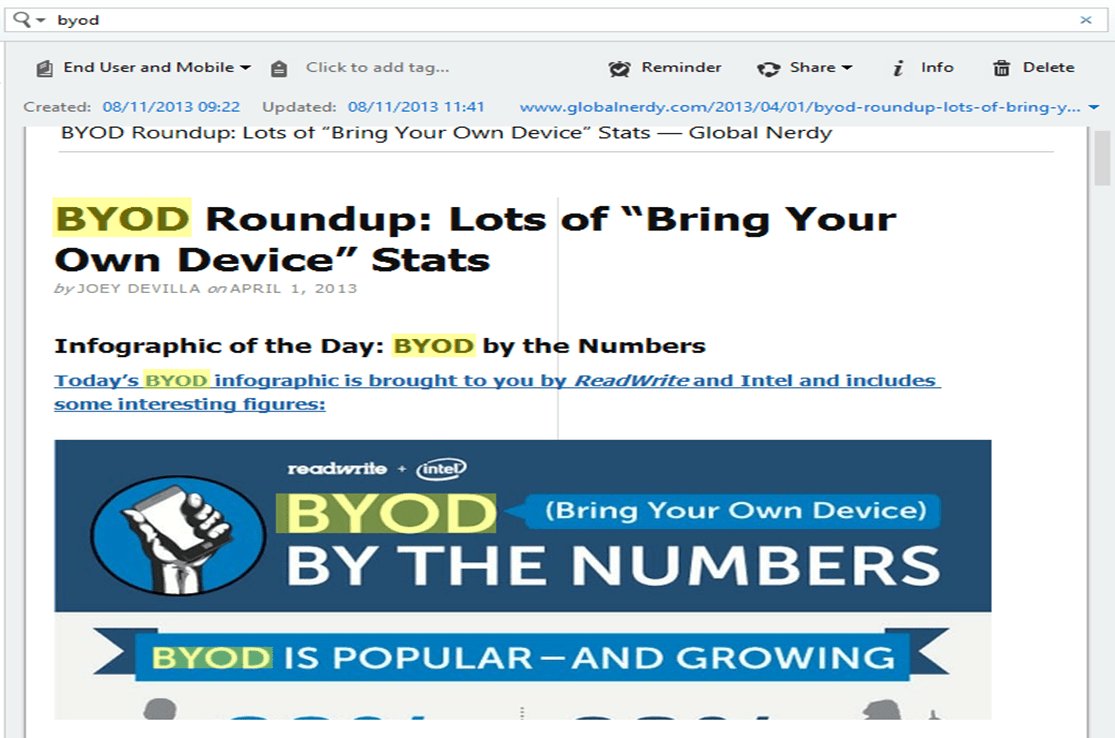
The other day I was searching Evernote when I noticed something really interesting about these highlighted results:

Evernote SearchAnything look interesting to you?

It might help to know that everything below the readwrite and intel symbols is an image and the two highlighted BYOD are in that image. Evernote indexed and allowed me to search the image highlighting where the text was found in the image.

This feature has been around for a long time apparently, but I’ve only just noticed it. How did I not know this?

The reality is, though, I nearly didn’t notice it this time either – it is so seamless. I love technology that just works.

If you want a bit more technical detail then this article might be a good place to start: How Evernote’s Image Recognition Works

Concept of the Day: Learned Helplessness

While discussing some work related issues the other day a colleague used the phrase:
Castle Stalker

Cultural change isn’t easy – especially when we’re operating in an environment where learned helplessness appears to be prevalent

He pointed to this link on Wikipedia.

That got me thinking: What is learned helplessness? Is it really prevalent in the context that we were talking about?

The first question took me on a journey of discovery, this is what I found:

First, a definition from the Wikipedia article:

Learned helplessness is the condition of a human or animal that has learned to behave helplessly, failing to respond even though there are opportunities for it to help itself by avoiding unpleasant circumstances or by gaining positive rewards

To bring it closer to our normal experience, it’s the choice not to respond when we see the opportunity to do something for a third, or forth time having failed on all previous attempts. Or the choice to avoid something because of a previous traumatic experience even though that thing might be very good for us.

Thinking about my life, I know that there are certain things that I don’t do because of previous poor experiences. Some of these experiences happened a long time ago and I’m a different person now, but I still haven’t returned to give it another go.

So from purely personal experience it would appear that learned helplessness is a real phenomenon, and there also appear to be quite a lot of evidential support for it too. The Wikipedia article is quite well referenced including 42 different items and there are numerous articles on reputable sites across the Internet.

Like all concepts and many theories though it isn’t a 100% cause-and-effect explanation, the initial experiment that was undertaken by Martin E.P. Seligman at the University of Pennsylvania on a number of dogs only resulted in learned helplessness in two-thirds of the animals involved. Some animals and some people respond in a different way. He also went on to link learned helplessness with clinical depression and other related mental illnesses.

The opposite of helplessness is, apparently, optimism, which Seligman later researched and wrote about, coining the phrase learned optimism. This involved the challenging of negative self-talk and numerous other positive psychology techniques. Seligman is still around and talking about a new era of positive psychology, but that’s a set of thoughts for another day.

Here’s my conclusion. Some people, in some situations, will behave with learned helplessness and that has serious consequences. We need to think very seriously about the situations that we create that induce helpless feelings. We also need to think seriously about the tools that we give people to help them respond to these helplessness situations as they inevitably occur.

I’m not going to answer the second question because that would need me to talk too much about the context. It is suffice to say that my colleague’s insight was quite revealing.

A couple of really interesting videos about Learned Helplessness to finish with:

Can We Induce Learned Helplessness?

Description of Learned Helplessness

BYOD and Productivity

In a recent post about Bring Your Own Device (BYOD) I wrote these words:
Ribblehead viaduct and goods train (a few weary walkers to)

The true focus of BYOD is not the D it’s the BYO. In order to accomplish what they are trying to do people are wanting to use what is familiar, what is flexible, what makes them productive and creative. The choice of device happens to be a tangible part of that, but it’s only a part.

I thought long and hard about that statement because I wanted to leave myself open to write a couple of more posts on the changing landscape of work. This is one of those posts.

One of the areas of work that is changing rapidly is the definition of productivity.

Productivity:

1. The quality, state, or fact of being able to generate, create, enhance, or bring forth goods and services.

2. Economics. the rate at which goods and services having exchange value are brought forth or produced.

So productivity is about goods and services, and the great thing about this definition is that anything can be defined as goods and services. But productivity is also, and just as importantly, about generation, creation, enhancement and bringing forth.

As an economic concept it’s about the ratio of outputs to inputs. In traditional manufacturing industries this definition leads to straightforward measures: the productivity of an organisation that produces widgets is measured by the number of widgets produced and the cost of producing those widgets. The productive organisation is the one that produces more widgets for a lower cost. There’s a whole industry built up around defining and measuring this kind of productivity.

In order to ensure that they are being productive, as a whole, organisations define measures of productivity within the component parts of the organisation. Some organisations push the measurement of productivity all the way down to the individual.

This is all still quite straightforward for traditional manufacturing organisations: how many door handles does Joe produce in an hour and how does that compare to Janet. But measuring productivity in a creative services organisation is far more troublesome. How do you measure the creative output of a graphic artist? How do you measure the output from a coder? If productivity is a measure of the ratio of inputs and outputs you need to be able to define them if you are going to improve them.

It’s these creative service organisation that are growing, particularly in the west. Also these are the organisations that are making the greatest use of BYO techniques. So productivity of these organisations is important and hence productivity of BYO is important.

People want to use BYO because it gives them improved productivity, but how do they know? How do you know what the best-in-class productivity approach is for an individual in a particular circumstance? How do you know if you are going to be more productive using iOS or Android? How do you know if you are going to be more productive using Evernote or OneNote?

Going further than the individual, how do you know what is the best-in-class productivity for a set of collaborative creative activities in a value chain?

Early in my career I had a manager who, for some reason I can’t remember, would write his memos in a spreadsheet (Lotus 1-2-3) on his home computer. He would bring the floppy disk in the next day and hand it to his administrator for formatting and printing. Because the formatting in the spreadsheet was so bad the Administrator would print out the raw material and retype it into her word-processor. He may have thought he was being productive by using his own tools, but his choice of tools dramatically impacted upon his Administrator’s productivity.

You might think that this is a ridiculous example in today’s world but I see many people chasing data that they can’t access because someone has processed and stored it in their choice of application and its associated repository.

I’m not advocating a return to the heavy-handed approach of one-size-fits-all that many IT organisations adopted (primarily because of an overbearing focus on cost rather than value). What I am proposing is that organisations should enable a BYO world with their eyes open to the new opportunities and new challenges that come with the change. BYO doesn’t mean a move to zero governance, it requires a move to different governance.

People want BYO not just a different D

There is a lot of talk around at the moment about organisations wrestling with people’s desire to use their own IT.

Tatton Park

This is generally framed as a Bring Your Own Device (BYOD) discussion.

I was reading through some advice published by the UK CESG yesterday on End User Device Security and Configuration. This advice includes some comments on BYOD:

Whilst enterprise ownership of a device makes many information security aspects much simpler, it is not a prerequisite of this guidance. What is necessary is that the device is placed under the management authority of the enterprise for the complete duration it is permitted to access OFFICIAL information. Hence, a BYOD model is possible – although not recommended for a variety of technical and non-technical reasons.

To ensure information security when using devices not owned by the enterprise, the enterprise must take control of device management at the point of provisioning, ensuring that the device is placed into a ‘known good’ state prior to allowing it to access OFFICIAL information. Limitations of current technology mean that a ‘health check’ or ‘device status’ check is not sufficient to verify ‘known good’ – malware can easily subvert such a check. Instead the device must be returned to an understood state such as via a firmware reinstall or wipe to factory state and any existing configuration on it replaced. It is only by taking over the enterprise management of the device that an organisation is able to ensure that information security policies are being applied.

End User Devices Security Guidance: Introduction

In other words – you can bring your own device if you like, but we are going to wipe it and place it under our management. Putting the relevance of this security approach to one side, it strikes me that this approach misses the true focus of BYOD.

The true focus of BYOD is not the D it’s the BYO. In order to accomplish what they are trying to do people are wanting to use what is familiar, what is flexible, what makes them productive and creative. The choice of device happens to be a tangible part of that, but it’s only a part. Allowing people to choose the device, but then wiping it and placing under central management seems to me like a misreading of what people are really looking for.

This takes me to a quote by Theodore Levitt, Professor of Marketing at Harvard:

“People don’t want to buy a quarter inch drill. They want to buy a quarter inch hole.”

(HT to Stu Downes)

Traditionally we have lived in an IT world where the organisation defines both the tools and the outcome. Increasingly though, employees are saying – “you define the outcome, let me define the tools”. Organisations have spent so long defining the outcome by defining the tool we’ve got a lot of change to go through before we successfully renegotiate the contract of delivery. But that’s a subject for another day.

Acronyms: BATS

In the early days of email my manager referred to it as BATS by which he meant Blame Allocation and Transfer System.

When he first used the phrase I wasn’t sure what he meant but over the years I have had many reasons to refer to email as BATS.

Chatworth with the FamilyAnyone who has been involved in email for any period of time has seen the situation where someone sends an email to a whole host of recipients for the sole purpose of CYA (Cover Your Ass).

In later discussion on the subject the sender says – “well I sent you an email about it”. The sending of the email is regarded as the ultimate seal of the transaction. This is often done without discussion or agreement, lack of decent it regarded as agreement.

This behaviour drives a culture where people are petrified of getting behind on email just in case someone has sent a BATS that they didn’t notice and now find themselves responsible for. This, in turn, leads to a culture where people find themselves attached to email 24 by 7.

Poor behaviour is driving poor culture which is driving poor behaviour. It’s about time we kicked the BATS habit because it isn’t doing any of us any good.

Perhaps it’s time to go without email completely – some people already have (almost)?

Concept of the Day: Confirmation Bias

I spend much of my life reviewing other people’s work and I think I do a reasonably good job of it but I’ve been thinking recently about whether I use a bit too much confirmation bias.

Confirmation bias is when you favour something because it agrees with what you thought. It’s confirmation bias that plays a major part in the ability of conspiracy theories to take hold and propagate. Confirmation bias also plays a major role in the proliferation of dubious healthy foods and diets. But confirmation bias can have far more significant impacts, it plays a major role in organisations’ inability to adapt to changing markets resulting in people loosing their jobs, it helps to create financial bubbles and crashes, it also causes doctors to overlook people’s real ailments because they are too focussed on finding the disease that they think it is.

Francis Bacon summed up the problem of confirmation bias with these words:

“It is the peculiar and perpetual error of the human understanding to be more moved and excited by affirmatives than by negatives.”

During the review processes that I participate in people present their solution to a problem posed by a customer. I’ve started to notice that it’s much easier to recommend solutions that look like the solution I would have proposed, compared to ones that are different to the way I would have done it. I would tell myself that this was because they were easier to understand, but I wonder whether this isn’t just subconscious confirmation bias.

The real challenge is to know the difference between experience and confirmation bias. Both experience and bias look and feel quite similar, but their value is radically different.

I recently listened to Dan Pink’s Office Hours discussion with Chip and Dan Heath on their book Decisive: How to Make Better Choices in Life and Work. They spend quite a lot of time discussion confirmation bias and different techniques to overcome it. I’ve set myself a bit of a task over the next few months to integrate some of these techniques into the review processes trying to flush out some of the confirmation bias that I’m sure exists.