Using Blogs as Conversations

Jimmy and Grandad contemplate going for a hair-cut

Much of the blog content produced is conversational in its nature – it’s one blogger linking to and making comment on the content provided by another blogger.

But are we providing the tools to enable a true conversation? Is it possible to see all of the elements of a conversation? Who else is involved in the conversation? Who has left the conversation and gone off to speak to someone more interesting?

I think that’s the point Scoble was getting at when he wrote:

I would love it if my blog tool could tell me more about the things I link to. For instance, how much traffic did it send to that person? How many people linked to it after my link (that would tell me the viralness of an idea)? How many times have I linked to Graham? How does that compare to the number of times I’ve linked to Dori Smith or Dave Winer? What’s the reciprocity of a link? (Did Graham link back and continue the conversation?)

What else would you like to see your blog tool tell you?

So here I am continuing the conversation and telling Scoble what I would like from my blog tools, but how does he know I’ve continued the conversation? Well he knows that I have continued the conversation because of the link above; but he would find it difficult to know that Drew has also added to the conversation because Drew’s link comes in the form of a comment on my original post. Unless Scoble visits my site he can’t see the comments and because he uses an aggregator, like I do, he isn’t likely to do that. Likewise, I find it difficult to see the people who have continued the conversation with Scoble. I have to go and visit his site to know that there are comments there; I would have to do some searching to find out who else has linked to his article; and then I would have to do the same thing again at the next tier of the conversation.

Getting all of this information together to see the whole conversation is not impossible today but it’s way too much like hard work. Because it’s too much like hard-work we don’t actually get the value from the conversation that we should and current search engines don’t actually help here. Search engines don’t rank information on the basis of it’s real true value (because that’s different for each individual), they rank it on the basis of how popular it is. Popularity can mean that something is good, but it’s only one dimension. Most artists that we now regard as masters even geniuses weren’t popular in their own time. We need to have tools that allow us to see the whole conversation so that we can find those pearls of wisdom that come from the person who’s brain has just put together a thought that would amaze us all, if only we knew it existed.

It’s as if all of the links are there, but that we haven’t quite the tools that help us to see it. Perhaps it’s time I got into coding again, it’s been a very long time and I’m not sure how transferable my Cobol skills are. Perhaps I should stick to being an ideas man.

The Scoble Effect

Jimmy plays it cool

The other day I wrote an article which referenced Scoble and his lack of appearance on Encarta. Robert noticed this  and duly posted.

The basic premise of my post was that while many of us blog-type-folk may think that people like himself are popular, they haven’t really generated true fame and that this blog thing is still really a bit niche. So I wondered what the impact of a popular blog would be on my humble blog.

I try to avoid being to much of a statistics head because I don’t actually write to be noticed, I write for the few people that I know read. I do, however, run statcounter on my site because I do like to look every now and again, and because I like to know which articles people keep going back to.

The last couple of days have been a little busier but only a little. On most days I get 20 to 30 visitors, yesterday 80, the day before 64. OK, in percentage terms it’s a big increase, but that would just be messing about with statistics.

There are clearly a number of possible reasons for this:

  • It’s the Christmas season and everyone has already switched off – some effect.
  • What I wrote wasn’t very interesting anyway – almost inevitable.
  • Scoble isn’t that interesting – too polite to say .
  • MSN integration with Encarta isn’t that interesting – not my place to say.
  • The problems with typepad meant that I missed all of the visitors – the post was missing for a while waiting to be restored .

It was only a bit of fun anyway, but I do find the whole social engineering, social networking, human behaviour effect fascinating – pity I know so little about it.

The Future of Groove

Haighton Hall

I’ve had a few conversations with people recently about the future of Groove. As it’s now a Microsoft product it wasn’t clear what role was left for it to play. There seems to be a reasonable amount of duplication of function, but not in the way that the function was delivered.

Marc Olsen has started bloging about that very issue. Seems that the path of integration into the Office family is reasonable well established and proceeding. I’ve not seen anything on the packaging though; so not sure whether you’ll still need to purchase it separately or whether it will become part of Office Standard, Professional, etc.

Will make for some interesting team scenarios in customer environments which are Microsoft focussed. If Microsoft do choose to bundle Groove into one of the standard Office packages it will also make for interesting times in Lotus focussed enterprises.

USB Memory Stick v Washing Machine

Lancaster Canal

Yesterday I transported some important information around in my pocket via the use of a USB memory stick. Today said pocket with associated trousers and USB memory stick went for a wash. While in the washing machine the USB Memory Stick got rather wet, suspect it got a bit dizzy too.

Anyway, it survives and is still usable. Clearly, the contents of a Memory Stick are not regarded as a stain by the chosen detergent .

Microsoft MSN Encarta Answers – A Bit of Fun

Slate and Leaves

After a bit of a heavy day yesterday I thought it would be nice to write about something a bit lighter: Microsoft MSN Encarta Answers.

If you add Encarta@conversagent.com to your MSN Messenger buddy list it will answer your questions via IM from Encarta. Assuming that is that Encarta knows about it.

Tried some interesting ones for blog people:

Graham Chastney says:
Who is Robert Scoble?

Encarta® Instant Answers says:
I don’t think I know Robert Scoble.  Let’s try an Encarta search. =>

Graham Chastney says:
Who is Dave Winer?

Encarta® Instant Answers says:
I know Dave Winer. Let me try to find an article for you. =>

Sorry Robert but you lost to Dave again. Not good when it’s your own organisation that doesn’t recognise you . Unfortunately it doesn’t get it right for Dave, sorry Dave. The funny thing is that the nearest it gets for Scoble is – Sulphur.

Graham Chastney says:
What is RSS?

Encarta® Instant Answers says:
I am sorry, I couldn’t find any definition or article relevant to this subject.  Please try asking me another way, or type “?” to see examples of questions I can answer.

Perhaps blogging hasn’t become all pervasive yet .

But at least it knows some important things:

Graham Chastney says:
Where is Preston?

Encarta® Instant Answers says:
Preston, borough, administrative center of Lancashire, northwestern England, on the Ribble River, near the Irish Sea. Preston is an important port,….

Graham Chastney says:
Where is Lancashire?

Encarta® Instant Answers says:
Lancashire, county, northwestern England; Preston is the administrative center. Lancashire comprises a lowland area in the west along the Irish Sea….
Let me take you to a map of lancashire. =>

Unfortunately they haven’t noticed that the ‘port’ in Preston has been completely replaced with a leisure and housing area, ah well?

Via The Unofficial Microsoft Weblog

Intuitive Software

North Berwick at Sunset

Is software intuitive ?

I used to have a manager who disliked any software change, he hated GUI software for at least 10 years after they were commonly used. His way of branding the problems was to state that the software wasn’t intuitive. By this he meant that when he wanted to do something that involved stringing a set of actions together it wasn’t clear to him what the next step was that would enable him to achieve the desired effect. Another way of saying this would be to ask if the software uses common sense.

Common sense seems to be a good way of describing the issue but actually there doesn’t seem to be much agreements on what common sense is:

“Common sense in an uncommon degree is what the world calls wisdom.” – Samuel Taylor Coleridge

“Common Sense is that which judges the things given to it by other senses.” – Leonardo da Vinci

“Common sense is the collection of prejudices acquired by age eighteen.” – Albert Einstein

“The three great essentials to achieve anything worth while are, first, hard work; second, stick-to-itiveness; third, common sense.” – Thomas Alva Edison

“Everybody gets so much information all day long that they lose their common sense.” – Gertrude Stein 

One thing is sure though common sense must make sense to at least one set of people.

The problem with common sense is that there is so much of it around. It’s common sense that you drive on the left in the UK, but it was clearly common sense to most of the rest of the world to drive on the right. It’s common sense in the UK that you write the day before the month and then the year; but in other countries (USA) it seems to be common sense to put the month first. It’s common sense to me to turn the light off when you leave the bathroom, but clearly no-one has told my children. The file system is the most common sense way of looking at the data stored on my hard disk but clearly not to Sue and not to others too. It’s common sense to a Nokia user like me to press the down key to get to the address book, but not to Jonathan who uses some other thing.

Some people talk about the browser being more intuitive, but I’m sure that it is. It may well be that it’s just presenting a simpler set of option and hence easier to understand. On most sites there are only a limited number of things that you can do after all and there is often only one thing to be looking out for – a hyper-link to somewhere else. As web pages become more interactive and bi-directional the issue of intuition comes back again.

Over the last few days I have been ranting a bit about the lack of process that accompanies many collaborative infrastructure implementation, but the other issue is that the software doesn’t follow my own personal common sense. I’m not going to get into details here, but it drives me nuts, but I’m not sure this is a common sense issue or simply a me issue. It doesn’t make sense to me, but it would need more people than that for it not to be common sense.

Perhaps I was talking more about common sense the other week when I was talking about respect. Not sure though, I think they are different issues.

If the Internet is going to get more interactive and the number of functions is going to increase it needs to build a global common sense which we all understand.  People are already doing it in their own space but that is requiring them to define common working process and agreement at quite a detailed level. This is a huge undertaking though, probably bigger than any other definition of common sense that we have ever done. This definition of common sense needs to cover every culture, every language, every device type and huge variety of functions. Personally I think that this is ultimately an impossible task and not because it is too hard, but because we humans don’t actually have a single common sense; that’s what makes us human.

We humans use our difference in common sense to innovate, to derive a new common sense. Imagine that we did agree a global common common sense – how would we ever change it .

Perhaps a global common sense is completely the wrong answer and a demonstration of what is wrong with the browser experience we offer today. Traditional browser applications inextricably link the data and the function. If you want to deal with this data you have to do it via the built in function for that individual page. Client/desktop based applications don’t do that. Take the issue if dictionaries and spell checking. On my client almost every application uses the same dictionary function and settings, this function knows which words are in my personal dictionary. When I use spell checkers online every one of them uses a different dictionary, some of them won’t let me use a real English one (only American). It’s a basic function but I don’t get any joy because there isn’t (and never will be) a global common sense for it. The saddest part of all of this is that there is a whole industry out there trying to sell people portals so that they can bind their staff into a corporate common sense that will stifle innovation and eventually bleed the organisation of any vitality. I’m not arguing here to go back to client/desktop applications, I’m arguing that we need to get on with splitting the functions from the data and delivering initiatives such as service oriented architectures (SOA) that allow people to derive their own common sense, which might be a browser based application, but might be a piece of client code, it might also be an automated engine that does something without being asked. The great thing about common sense is that there is so much of it.

Still no process

Fraisethorpe

I decided that maybe I was being a bit harsh yesterday when I said:

Today I am involved in a project where they have decide to create a collaboration space without any agreed process or even purpose. This collaboration space is delivering absolutely no value and is unlikely to get used until we give it a purpose; a process; a practice. What makes this one even worse is that the lack of process has lead to a choice of technology configuration which is sub-optimal at best, and in some instances is non-existent .

I have to admit at the point I wrote that comment I hadn’t actually read any of the supporting documentation for the collaboration space. I don’t often read this type of documentation because it is normally solely focussed on the technical steps involved in doing the things that you could do in the collaboration space, with little or no effort placed into defining how the collaboration space should be used.

In order to be completely fair I have, today, read the documentation.

I’d love to be able to say that the documentation defined a whole process and working practice that I thought was brilliant and inspired me to use the collaboration space but alas no . The documentation told me which things to lick to perform what function.

Ah well, I’ve repeated the rant above – nothing to add, nothing to take away .

Internet Fishing Metaphor

Lancaster Canal

Those of you who have read this blog over time (and especially those of you who read Happenings) will know that I like a metaphor. Actually some article I wrote using the car as a metaphor for IT device form factors is still one of my most popular posts.

Today Phil Windley picked up on Dave Winer’s metaphor for the Internet – fishing. Rather than seeing the internet as a set of places to visit Dave used the phrase:

Now, happily every time one of my contacts puts up a new picture, it shows up in my River of News and gets hooked on my fishing pole.

Phil’s comment was:

Second, the metaphor of “rivers of news” and getting “caught” on Dave’s fishing pole are ones I’ve used before in presentations and articles. I think it describes the reason why RSS is important and why using it is an adjustment for some people. They think of the Web as a collection of places to go visit rather than as streams of information to stand in and enjoy.

I really like this idea of the Internet transitioning from a relatively static reference entity into a dynamic thing that sweeps past you, like a river. The water flowing down the river doesn’t go away. It still exists and can be collected from further down the river if you want to or even from the sea, but that doesn’t stop the river flowing. We can set up nets and collect things from the river. As with fishing I am sure that there will be a great market for people who understand where best to fish.

I no longer see the Internet as a set of places to visit, and didn’t before I saw this metaphor, but the metaphor helps. Why should I go and visit places to see if there is anything interesting to see; why should that be my job; why can’t the information infrastructure tell me that there is something new – the joy of RSS and syndication. I get increasingly frustrated when working with teams of people where they want me to visit a web site or application on a regular basis to see if there has been any update. I came across an application the other day that sent out email updates but put it into the hands of the author to decide whether other people should be told about the update, what a ridiculous idea. I want to decide what I get told about.

All I need now in the Christmas season is some kind of RSS feed from the physical shops telling me that something interesting has come in rather than walking the high street in the full knowledge that what I am looking for doesn’t exist .

Technology without Process – Again

GrafitiTime for a bit of a rant.

Why won’t technology people learn that technology achieves – NOTHING unless it is accompanied by a process change. One of the reasons that personal computing is so powerful is that it enables people to change there own process without too much impact on other people. When it comes to collaboration technologies though, this all gets blown out of the water. It is absolutely essential that members of the team understand how they are going to collaborate. Having a collaboration space achieves – NOTHING.

Yesterday I read how Marc Orchant’s organisation had taken a whole set of state of the art processes and practices and applied them to a number of things which they had decided were broken (presentation, meetings, email, etc.). It’s about process, not about technology. The technology gives them something which they need to control having the process allows them to gain the value. Now that’s the right way to do it .

Today I am involved in a project where they have decide to create a collaboration space without any agreed process or even purpose. This collaboration space is delivering absolutely no value and is unlikely to get used until we give it a purpose; a process; a practice. What makes this one even worse is that the lack of process has lead to a choice of technology configuration which is sub-optimal at best, and in some instances is non-existent .

The link of process and technology is such an old issue it’s frightening. I have certainly known it for nearly 20 years and yet as an industry we ignore it time and time and time again. Perhaps we don’t learn from our history .

Count Your Blessings #42 – Time Travel

pneHow dull it would be to live each day completely in today, no looking forward and no looking back. But just having one of the perspectives would be equally problematic. Imagine not having any forward view, nothing would ever get done, things would always be a surprise, they would often be a shock. For most of us it would mean that we would never do anything because we would have no motivation to do it; why bother. Having no history would be equally troubling; how would we be able to perceive the likely future if we had nothing to reference it to. Imagine watching children grow up without being able to reference our own childhood and how we felt.

It goes even further than that though, some people are dominated by their history or by their future. This dominance blinds them to see today, the future or the past overshadows all.

How we travel time has a huge impact on who we are.

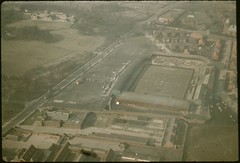
Yesterday someone posted a set of aerial pictures of Preston, Lancashire where I live to Flickr. These pictures were all from the 1950’s and showed a town that is similar in structure to the town I know, but it has gone through many changes. For one thing Preston has become a city but it’s more physical than that. The railway sidings that used to dominate the area around the railway station are no longer there. The old football ground has been completely replaced with a new one. The docks area is still an active dock, rather than the leisure and housing area it is today. The bus station which they are currently contemplating knocking down doesn’t even exist. There are a lot more chimneys. 

Seeing these pictures gave me another perspective on my city, not only because they were taken from an angle that you wouldn’t normally see, but also because they are more than 50 years old. They allowed me to travel through time to a time before I was born. They allowed me to realise that changing the bus station wasn’t such a big deal because it hadn’t been there that long anyway. They allowed me to travel from the past, through the now into the future.

preston from above

Time travel is a marvelous thing.

I love to time travel in my personal life too. Like most parents I look at my children and see them changing almost every day. I love to remember carrying them on my arm when they were tiny. I love to remember them going to school for the first time or riding their bike for the first time. I look at their life and compare it to my own experiences. I use these experiences to imagine a future for them; a future that looks OK because they are great kids. It could all go horribly wrong, but that’s not what I imagine. I see them riding their bikes today and imagine them driving a car tomorrow. I see them doing tests today and imagine them doing exams tomorrow.

Time travel can be very informative.

Yesterday I wrote the traditional family letter letting all of those people who we only meet occasionally in on our year. As preparation I looked through the photographs we have taken over the year (it’s much easier with digital pictures). It was great to look through all of these pictures and be reminded of the things we have done. There’s a picture of us all swimming in a lake; there’s a picture of Jonathan and I flying up into the sky at a Theme Park; there’s a picture of Sue and Emily hugging at New Year. I use these memories to imagine the adventures that we already have planned for next year, but also to imagine new adventures that we might not do for many a year.

There are a thousand more memories and another thousand future plans spinning around my head right now as a write. In the midst of it all are a number silver threads that binds the future and the past together, silver threads of relationships. Relationships with Sue, Jonathan and Emily; relationships with friends; relationships with other family members; and most importantly a relationship with a Father God. Each of these relationships has a history and a future that gives me a context for today. I know that my future is assured and taken care of. That doesn’t mean that I’m not going to see heartache but it does mean that ultimately it will all be resolved. At the end of my life there is another life to come, on that I can be assured.

None of this fazes us because Jesus loves us. I’m absolutely convinced that nothing–nothing living or dead, angelic or demonic, today or tomorrow, high or low, thinkable or unthinkable–absolutely nothing can get between us and God’s love because of the way that Jesus our Master has embraced us.

Romans 8

Broken Meetings – now there's a surprise :-)

Raspberry

The MindJet blog has some interesting statistics today on how broken meetings are:

Our European sister office has conducted a study about meeting culture in European companies. The majority of the 800 business professionals surveyed were executives or senior managers. The results are somewhat alarming: Every other meeting is considered unproductive.

According to the study, 61% of the respondents said that meetings could be more efficient or are even a complete waste of time, and 71% saw great potential for optimising meetings if they were better prepared. 46% said that a more easily accessible display of complex information and tasks would help significantly to maximize the outcome of meetings. 61% of the respondents saw insufficient analysis of facts, and 57% pinpointed redundant and inefficient processes as the main reasons for hampering internal and external decision-making.

Moreover, a majority of respondents contended that existing knowledge would not be optimally utilized within their organization. More than half of the respondents referred to more flexible project planning, more transparent communications, and tighter project management as the three main factors needed to better harness team knowledge and increase productivity.

I wonder whether they differentiated the survey on the difference between face-to-face meetings and teleconferences. My experience would suggest that these numbers are even worse for teleconferences. I get invited to one particular set of meetings when it nearly always takes 20 minutes to get everyone on the call and get all of the technology sorted. The 20 mins is completely wasted. What makes it worse is that I know (because I’m also doing it) that most people are not focussed on the meeting at all.

Via The Office Weblog

Is bundling really the issue?

Beach

Microsoft Monitor today has an article about how bundling is still core to the Microsoft product strategy:

Bundling–and that’s a very unpopular word at Microsoft–is at the very core of the company’s current product strategy. Microsoft has always integrated technologies into Windows, and many bundled pieces brought consumers and businesses tremendous benefits. But as Microsoft’s dominance has grown, integration has been viewed by some regulators and trustbusters as an anti-competitive tactic, of Microsoft trying to leverage Windows into new markets or crush potential competitive threats to the operating system monopoly.

The issue I have with the Microsoft Monitor article is that it then goes on to link bundling with integration:

As integration increases, as Microsoft adds more features to Windows and Office that could eliminate existing revenue generating third-party products, I expect trustbusters to receive more complaints and so engage more investigations. I’m not alleging that Microsoft is overtly doing anything wrong. That determination is for the legal processes. I merely observe that with the focus of major antitrust cases against Microsoft being about bundling, at a time when the company is so focused on integration, more legal problems are likely than less.

For me, integration is a different issue to bundling. Bundling is when stuff is included and you may struggle to extract it. Integration is when things work together and deliver functionality to each other. I expect, even demand, Microsoft software (and any other vendor) to integrate. I don’t want to use an environment which has a set of silo application that don’t know each other exists. For me the real anti-trust issue is whether Microsoft does the integration in such a way that others are excluded, or whether bundling is done in such a way that it can’t be removed. I’m not sure that bundling is actually the right word for these issues though, I think that the right word is actually amalgamation. The issue being that capability is cemented into something, using up my resources without me wanting it, excluding me from using something else and not allowing me to remove it. But that is where I’m actually slightly schizophrenic, because I do want packages of capability, but I don’t want bloat, I want things delivered in easy to apply clumps, but I want choice. I want a full meal, but I also want pick-and-mix.

Perhaps the meal analogy is a good one. If the meal doesn’t include the right ingredients we don’t buy it. Sometimes we want full say over the ingredients, and pay for the privilege (a-la-carte); sometimes we want cheap and fast and just don’t eat the bits we don’t like (gherkins in burgers) sometimes we want something in the middle. It’s  a balancing act. We always want a fully cooked meal (integration), we want a reasonable amount of food (bundling), we don’t want a whole weeks food in one go (amalgamation). I’m probably pushing the analogy beyond breaking point here, but sometimes that’s fun.

Microsoft’s challenge, therefore, is to achieve integration and bundling at a level that doesn’t result in wholesale amalgamation.